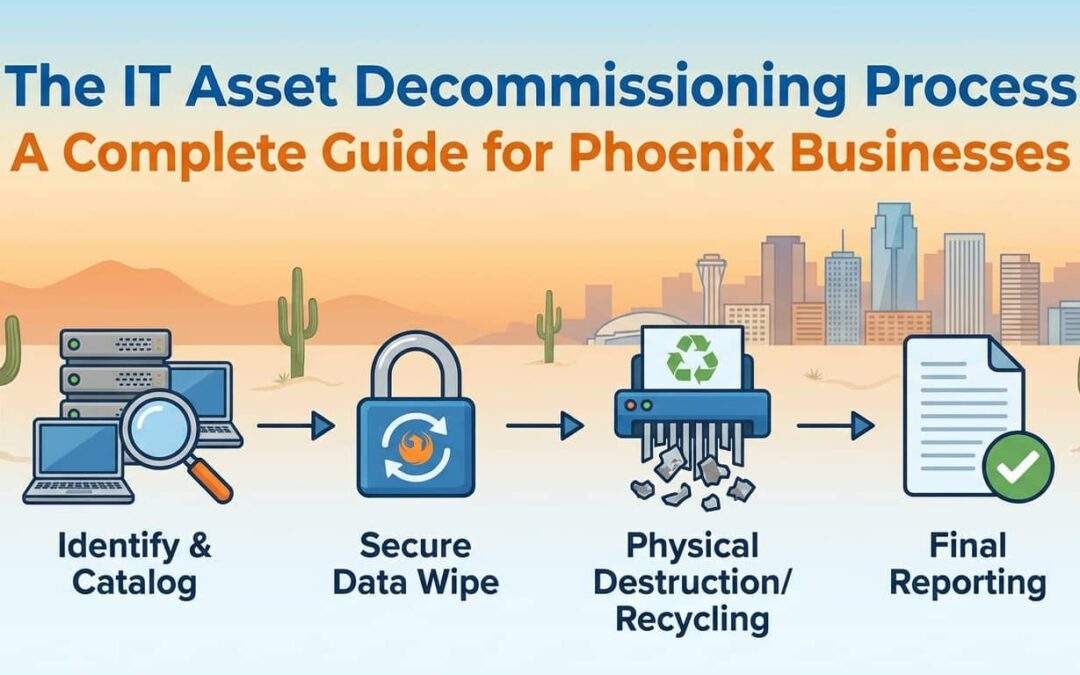
Your old servers hold more than dust. They store customer records, financial data, and login credentials. Without a clear IT asset decommissioning process, that data stays vulnerable long after you’ve unplugged the hardware.
Phoenix businesses face real risk when they skip proper retirement steps. Data breaches happen. Compliance audits fail. Equipment sits in storage with sensitive files intact.
So how do you protect your business while retiring IT hardware? Let’s break down the process that keeps your data secure and your operations compliant.
What Does IT Asset Decommissioning Mean?
IT asset decommissioning is the formal process of safely removing technology from active use. It covers everything from inventory tracking to data destruction to final disposal.
Think of it like retiring a company vehicle. You don’t just hand over the keys and walk away. You clear out personal items, cancel insurance, transfer the title, and document the sale. IT asset retirement works the same way—just with higher stakes.
The goal is to eliminate all data, document the process, and dispose of hardware responsibly. Decommissioning differs from simple disposal because it includes security protocols, compliance checks, and chain-of-custody tracking.
When done right, decommissioning protects your business from data breaches and regulatory penalties.
Who Needs IT Asset Decommissioning Services?
Any business that handles sensitive data needs a formal decommissioning process. But certain industries face stricter requirements.
Healthcare organizations must follow HIPAA standards when retiring devices that stored patient records. A single unwiped hard drive can trigger massive fines.
Financial services firms deal with account numbers, Social Security data, and transaction histories. Regulatory audits check how you disposed of old systems.
Legal practices handle privileged communications and case files. Client confidentiality extends to how you retire computers and servers.
Government contractors must meet federal security standards. Improper disposal can void contracts and security clearances.
Growing businesses in Phoenix also benefit. When you upgrade systems or move offices, proper decommissioning prevents data exposure and compliance headaches.
If your business stores customer data, employee records, or financial information, you need professional IT asset decommissioning services.
When Is the Right Time to Decommission IT Assets in Phoenix?
Timing matters more than hardware age. End-of-life IT assets create security gaps the moment they leave active use.
You should start the decommissioning process when:
- Equipment reaches end-of-service: Manufacturers stop security patches and support. Unpatched systems become entry points for breaches.
- You’re upgrading or migrating: Office moves and system refreshes create confusion. Devices get lost or stored without proper data removal.
- Hardware fails or gets replaced: Broken servers still hold intact data. Don’t let failed equipment sit in closets unprotected.
- Compliance audits are approaching: Regulators check disposal records. Last-minute scrambling creates gaps and penalties.
- Lease agreements end: Returning leased equipment without data destruction exposes your business. Lessors don’t clear drives for you.
For Phoenix businesses, summer heat can accelerate hardware failure. Plan decommissioning before equipment dies and forces rushed decisions.
The right time is always before old assets become a security problem.
What Happens During the IT Asset Decommissioning Process?
A proper IT decommissioning workflow removes uncertainty and risk. The process follows clear steps that protect data and document every action.
First, your provider inventories all assets and identifies what data they hold. Nothing gets removed until everything is tracked.
Next comes secure backup and transfer of active data. You keep what you need before destroying what remains.
Then hardware gets safely disconnected and removed from your network. This prevents unauthorized access during the transition.
After removal, certified data destruction eliminates all information from drives. Multiple methods ensure complete erasure.
Finally, hardware either gets recycled, remarketed, or disposed of according to environmental standards. You receive detailed documentation proving compliance.
Each step includes verification and reporting. You maintain a complete chain of custody from active use to final disposition.
We’ll cover the specific steps in detail below.
Key Steps in the IT Asset Decommissioning Process
The IT asset decommissioning checklist breaks into seven core phases. Each phase builds on the previous one to ensure complete protection.
Following this order prevents common mistakes like destroying data before backup or removing equipment without documentation.
Here’s the complete sequence:
- Inventory & Asset Assessment
- Data Backup & Transfer
- Deinstallation & Network Disconnection
- Secure Data Destruction
- Asset Disposition (ITAD)
- Disposition (Remarketing, Recycling, Reuse)
- Documentation & Reporting
Let’s examine each step and why it matters.
Inventory & Asset Assessment
Asset tracking starts before anything gets unplugged. You can’t protect what you haven’t identified.
Your provider creates a complete inventory of hardware being retired. This includes serial numbers, device types, locations, and data classifications.
Assessment determines which assets hold sensitive information and which need special handling. Not all equipment requires the same level of security—but you need to know the difference.
Tag each device for tracking throughout the process. Labels stay attached until final disposition.
Common mistake to avoid: Skipping devices that “seem empty.” Hidden partitions and cached data live on drives you think are clean. Inventory everything.
This phase also identifies licensing and software that can be recovered before disposal. You might be able to transfer licenses to new hardware and save costs.
Data Backup & Transfer
Data migration happens before destruction. Once you wipe a drive, that data is gone forever.
Your provider works with your IT team to identify critical files, applications, and configurations. Everything active gets backed up to secure storage or transferred to replacement systems.
This step requires coordination. System administrators verify backups are complete and test restoration before proceeding.
For servers, this might include database exports, user profiles, email archives, and application data. For workstations, it covers documents, settings, and browser profiles.
Common mistake to avoid: Assuming cloud sync means everything is backed up. Local files, cached data, and configuration settings often live only on the device.
Verify backup integrity before moving to data destruction. Run test restores. Check file counts. Confirm nothing critical got missed.
Deinstallation & Network Disconnection
Safe removal prevents unauthorized access during the decommissioning window. Once you decide to retire equipment, isolate it immediately.
Technicians disconnect devices from your network to eliminate remote access risks. This includes unplugging ethernet cables, disabling WiFi, and removing from domain management.
For servers, this means graceful shutdown of services and proper notification to users. You don’t want critical applications going dark without warning.
Physical removal happens next. Equipment gets labeled and moved to a secure staging area. Nothing sits in hallways or unlocked storage rooms.
Common mistake to avoid: Leaving devices powered on and connected “just in case.” Every minute of connectivity is a security exposure.
Document which devices came from which locations. This matters for asset tracking and helps identify what replaced what.
Secure Data Destruction
Certified data erasure is where security truly happens. Deleting files or formatting drives isn’t enough.
Professional providers use NIST-approved methods that overwrite data multiple times. Software-based erasure works for functional drives. Degaussing destroys magnetic media. Physical destruction crushes or shreds drives beyond recovery.
The method depends on data sensitivity and hardware condition. Failed drives that can’t be wiped must be physically destroyed.
Each drive receives individual verification. Your provider documents the destruction method, completion status, and any failures.
Common mistake to avoid: Trusting a “quick format” or single-pass wipe. Forensic tools can recover data from drives that seem clean. Use multi-pass methods approved by security standards.
You receive certificates of destruction showing serial numbers and destruction dates. Keep these for compliance audits.
Asset Disposition (ITAD)
IT Asset Disposition determines what happens to hardware after data destruction. This isn’t just disposal—it’s strategic recovery.
Working equipment might have resale value. Your provider evaluates condition and market demand to maximize return.
Some organizations prefer destroying all retired assets regardless of condition. Others want to recover costs through remarketing.
Environmental responsibility matters too. Electronics contain hazardous materials that require proper handling. Landfill disposal isn’t legal in most jurisdictions.
Common mistake to avoid: Treating all hardware the same way. Servers and network gear hold value. Older workstations might only be worth recycling fees.
Your ITAD provider should offer flexibility. Mix and match disposition methods based on device type and business needs.
Disposition (Remarketing, Recycling, Reuse)
Hardware remarketing turns retired assets into recovered capital. Functional equipment finds second-life buyers through certified channels.
Your provider wipes data, tests functionality, and lists equipment for sale. You receive proceeds minus processing fees.
Recycling handles equipment with no resale value. Certified recyclers break down devices into raw materials. Metals, plastics, and rare earth elements get recovered and reused.
E-waste recycling must meet environmental standards. Your provider should hold certifications like R2 or e-Stewards.
Reuse might mean donating equipment to nonprofits or schools. Some businesses prefer supporting their communities over maximizing returns.
Common mistake to avoid: Choosing disposition based solely on price. Certification and environmental responsibility matter for compliance and reputation.
Ask for documentation showing where equipment went and how it was processed.
Documentation & Reporting
Compliance reporting closes the loop on decommissioning. Without documentation, you can’t prove proper disposal.
Your provider delivers detailed reports showing:
- Complete asset inventory with serial numbers
- Destruction methods for each device
- Certificates of data erasure or destruction
- Disposition records (recycled, remarketed, destroyed)
- Environmental compliance documentation
- Chain of custody tracking
These records satisfy compliance audits from HIPAA, SOX, GDPR, and other regulations. Store them with other security documentation.
Common mistake to avoid: Treating documentation as optional paperwork. Auditors will request proof of proper disposal. Missing records can trigger penalties even if disposal was done correctly.
Ask for both summary reports and detailed manifests. You need high-level overviews for management and granular records for auditors.
Why Should You Care About the Hardware Decommissioning Process?
Improper disposal creates lasting security and financial risk. Most businesses focus on active systems while ignoring retired equipment.
But data breaches often trace back to discarded hardware. Old servers sitting in storage closets. Donated computers with files still intact. Recycled laptops sold at auction with customer records.
When breaches happen, regulators don’t care that the device was “retired.” You’re still liable for the data exposure.
Beyond security, environmental responsibility matters. Electronics contain lead, mercury, and other hazardous materials. Improper disposal harms communities and violates environmental laws.
Insurance carriers and compliance auditors increasingly check disposal processes. Missing documentation or improper methods can trigger coverage denials and audit failures.
The hardware decommissioning process protects your business reputation. One news story about customer data found on resold equipment can destroy years of trust.
Proper decommissioning isn’t optional anymore. It’s foundational security hygiene that every responsible business must maintain.
What Can Go Wrong If You Don’t Follow a Proper Process?
Skipping formal decommissioning creates predictable failures. These aren’t theoretical risks—they happen regularly to unprepared businesses.
Data breaches from resold equipment: Your old computers end up at flea markets with customer files intact. Buyers extract data and either exploit it or report you to regulators.
Compliance violations and penalties: HIPAA fines start at $50,000 per violation. Financial regulators can ban you from holding customer data. One audit failure can cost more than years of proper disposal.
Failed audits and lost contracts: Government and enterprise clients require proof of proper disposal. Missing documentation disqualifies you from bidding or renews.
Environmental violations: Dumping electronics in landfills violates EPA rules. Fines and cleanup costs multiply quickly.
Incomplete data migration: You destroyed drives before verifying backups. Critical files are gone forever. Recovery is impossible.
Chain of custody gaps: Equipment disappeared during an office move. You can’t prove it was destroyed. Assume breach and notify affected parties.
Intellectual property theft: Retired development servers held source code and trade secrets. Competitors now have your proprietary designs.
The pattern is clear: shortcuts compound into catastrophes. Proper process prevents predictable failures.
Why the IT Asset Decommissioning Process Is Important for Phoenix Businesses
Phoenix companies face unique compliance and operational challenges. Understanding local context helps you protect your business better.
Arizona’s growing tech sector attracts regulatory attention. Healthcare, finance, and government contracting all have strong Phoenix presences. That means stricter oversight and more frequent audits.
The city’s rapid growth creates frequent office relocations and expansions. Every move is an opportunity for equipment to get lost or improperly disposed of.
Let’s break down the three core reasons IT asset decommissioning in Phoenix, AZ matters for your business.
Data Security
Phoenix businesses handle sensitive data from across the Southwest. Your servers store customer records across multiple states with different privacy laws.
One breach can trigger notification requirements in California (CCPA), Nevada, and Arizona simultaneously. Each state has different rules and penalties.
Local competitors watch for security failures. In tight markets, one data breach can shift customers to rivals who demonstrate better protection.
Proper decommissioning eliminates the weakest link in your security chain—retired equipment.
Compliance
Arizona healthcare organizations must follow HIPAA. Financial firms answer to federal regulators. Government contractors face NIST standards.
Auditors specifically check disposal processes. They want to see:
- Documentation of data destruction
- Certificates from certified providers
- Chain of custody records
- Environmental compliance
Missing any of these can fail an audit. Failed audits trigger penalties, contract losses, and increased scrutiny.
Phoenix’s mix of industries means many businesses face multiple compliance frameworks. One decommissioning process must satisfy all of them.
Efficiency
Proper decommissioning recovers value from retired assets. Phoenix companies can remarket equipment through regional channels or donate to local schools and nonprofits.
Environmental benefits matter too. Arizona’s electronics recycling programs keep hazardous materials out of landfills.
Efficiency also means fewer emergencies. When you plan decommissioning, you avoid rushed decisions and expensive mistakes.
A formal process saves time during office moves, system upgrades, and regulatory audits. Everything is documented and defensible.
Why the IT Hardware Decommissioning Process Must Be Done Right?
Certified providers separate professional disposal from amateur attempts. The difference shows in documentation, methods, and accountability.
Chain of custody tracking proves every device was handled properly. You know where equipment went and how data was destroyed.
Certified destruction methods meet regulatory standards. NIST-approved erasure or physical destruction ensures data can’t be recovered.
Environmental certifications show responsible recycling. R2 and e-Stewards credentials prove your provider follows best practices.
Insurance and bonding protect you if something goes wrong. Professional providers carry liability coverage for data breaches and environmental violations.
Price shouldn’t be your only consideration. The cheapest provider might skip security steps or lack proper certifications. One breach costs more than years of professional service.
Look for providers who understand Phoenix business needs. Local knowledge helps with Arizona compliance requirements and regional disposal options.
The right partner makes decommissioning invisible. They handle complexity while you focus on running your business.
Who Should Handle the IT Hardware Decommissioning Process?
Professional ITAD providers bring expertise your internal team likely lacks. Decommissioning requires specialized tools, knowledge, and certifications.
Your IT staff can prepare equipment and coordinate timing. But certified destruction and disposition need external partners.
Look for providers who offer:
- Certified data destruction using NIST-approved methods
- Complete documentation for compliance audits
- Flexible disposition options (remarketing, recycling, destruction)
- Chain of custody tracking from pickup to final disposition
- Local presence in Phoenix for faster service
- Insurance and bonding to protect against failures
Interview potential providers about their processes. Ask for sample reports. Check certifications. Verify insurance coverage.
The best providers become partners. They understand your business needs and adapt their process to match your security requirements.
Don’t trust disposal to the lowest bidder or attempt DIY destruction. Professional handling costs less than one breach or compliance failure.
Conclusion
The IT asset decommissioning process protects your business from predictable security and compliance failures. Every retired device holds risk until properly destroyed.
Phoenix businesses face growing regulatory scrutiny and competitive pressure. Proper disposal demonstrates security maturity and professional operations.
The process isn’t complicated when you work with the right partner. Inventory, backup, disconnect, destroy, dispose, and document. Each step builds protection and eliminates risk.
Start with an assessment of your current assets. Identify equipment that’s already retired but not properly decommissioned. Those devices represent immediate risk.
Then establish a formal policy for future decommissioning. Make it automatic and consistent. Remove decision-making and shortcuts.
Don’t wait for an audit or breach to force action. Proactive decommissioning costs less and protects more than reactive crisis management.
Ready to protect your business with proper IT asset decommissioning? Contact our Phoenix team for a free assessment. We’ll review your current assets and create a custom decommissioning plan that fits your security needs and budget.
Your data deserves better than a storage closet. Let’s retire your equipment the right way.
The IT asset decommissioning process protects your Phoenix business from data breaches, compliance failures, and environmental violations. Every server, workstation, and network device you retire holds sensitive information that needs proper destruction.
You’ve learned the seven critical steps: inventory, backup, disconnection, destruction, disposition, and documentation. Each phase eliminates risk and builds a defensible compliance record.
Don’t let old equipment become your biggest security weakness. Retired hardware sitting in storage closets or donated without proper wiping creates lasting liability. One data breach costs more than years of professional decommissioning service.
JHIE Scrap brings certified IT asset decommissioning services to Phoenix businesses of all sizes. We handle everything from initial assessment to final documentation. Your equipment gets tracked through our complete chain of custody process.
Our team understands Arizona compliance requirements and local business needs. We’re not a national call center—we’re your Phoenix neighbors at 3334 W McDowell Rd, ready to protect your business with proper disposal.
Ready to eliminate IT asset risk? Start with a free assessment. We’ll inventory your retired equipment, identify security gaps, and create a custom decommissioning plan that fits your timeline and budget.
Your customers trust you with their data. Show them that trust extends all the way through proper disposal.
Protect Your Business with Professional IT Asset Decommissioning
Stop worrying about data exposure from retired equipment. JHIE Scrap provides certified decommissioning services that Phoenix businesses trust.
What You Get:
- Free assessment of your current IT assets
- Certified data destruction with documentation
- Flexible disposition options (remarketing, recycling, or destruction)
- Complete compliance reports for audits
- Local Phoenix service with fast response times
Schedule Your Free IT Asset Assessment Today
📍 Visit Us: 3334 W McDowell Rd Unit 17, Phoenix, AZ 85009
📞 Call Now: (602) 272-4033
📧 Email: JayHoehlinc@gmail.com
🌐 Learn More: jhiescrap.com