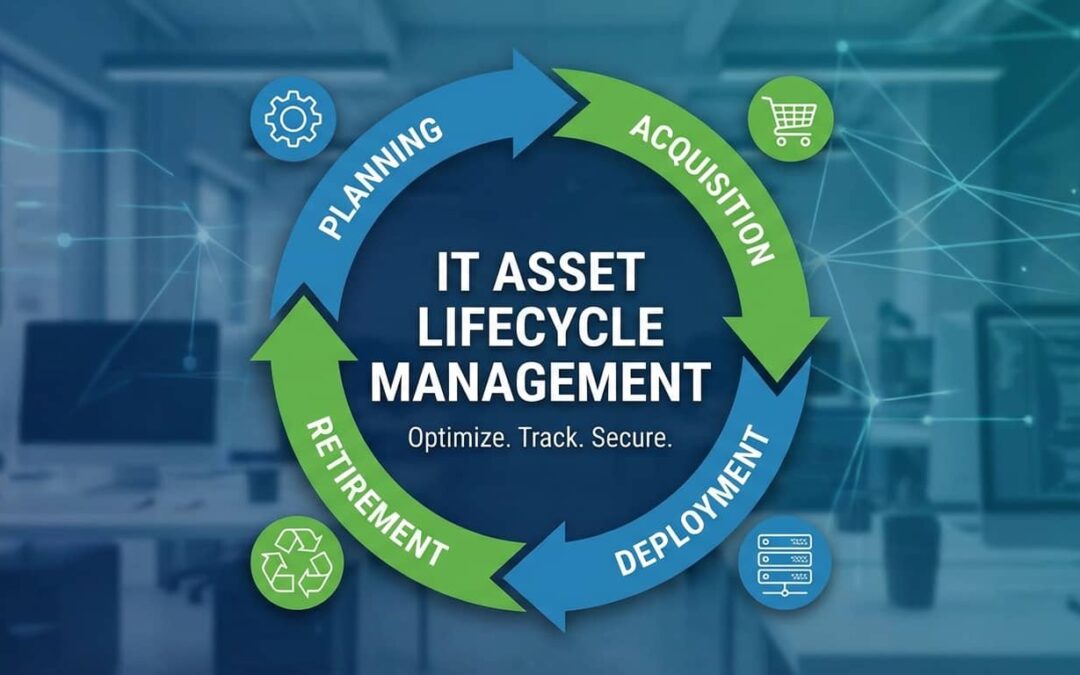
IT asset lifecycle management is the process of tracking your technology from the moment you plan to buy it until the day you retire it. Think of it as a roadmap that follows your laptops, servers, and software through every stage—planning, buying, using, maintaining, and finally disposing.
Ever feel like you’re losing track of your tech once it’s deployed? You’re not alone. Many teams struggle to manage assets once they’re out in the field.
The lifecycle has five core stages. Planning sets your requirements and budget. Acquisition gets the right tools in your hands. Deployment puts them to work. Maintenance keeps them running. And disposal closes the loop safely.
Each stage builds on the last. Skip one, and you’ll feel it later—usually as surprise costs or security gaps.
Here’s the thing most people miss: asset failures don’t usually happen because of heavy use. They happen because of poor tracking during transitions between stages. A laptop gets deployed without a tag. An old server sits forgotten in a closet. A software license renews when nobody’s using it anymore.
Good lifecycle management eliminates that confusion. It keeps you in control from start to finish.
Why Asset Management Is Necessary for Organizations in Phoenix
Phoenix is growing fast. Tech startups, schools, healthcare networks, and finance firms are all scaling up. That means more devices, more software, and way more complexity.
Running a business without asset management is like driving the desert without a map. You might make it. Or you might break down under the sun.
Here’s why Phoenix businesses need this now:
Compliance keeps changing. Local IT regulations, data privacy laws, and industry standards shift constantly. Asset management systems help you track what you own, where it is, and whether it meets current rules.
Growth outpaces visibility. Phoenix’s rapid tech expansion means many companies outgrow their systems before they even realize it. Lifecycle planning avoids that blind spot.
Downtime costs more here. When your operations depend on tech, every minute of failure hurts. Asset management reduces surprises by flagging maintenance needs early.
Security isn’t optional. Lost laptops, unpatched software, and orphaned accounts create risk. Tracking assets means knowing exactly what needs protection.
Phoenix businesses that manage their IT lifecycle stay ahead of operational chaos. They know what they own, what it costs, and when to replace it. That’s not just smart. It’s survival in a competitive market.
Key Benefits of Using Asset Management in Your Business
Finally, a system that works.
Asset management doesn’t just organize your tech. It protects your budget, boosts efficiency, and gives you peace of mind.
Here’s what you actually get:
Cost control that sticks. You’ll know exactly what you own and what it costs to run. No more surprise renewals or ghost licenses draining your budget. Automating maintenance schedules alone can save thousands in emergency repairs—something most small businesses overlook.
Downtime drops fast. Maintenance alerts catch problems before they kill productivity. You fix small issues instead of scrambling when systems crash.
Better compliance tracking. Every asset has a digital trail. That makes audits easier and keeps you aligned with local regulations.
Smarter buying decisions. Historical data shows what worked and what didn’t. You stop guessing and start investing in tools that actually deliver ROI.
Security you can prove. Know where every device is, who’s using it, and when it was last updated. That visibility closes gaps hackers love to exploit.
Longer tech lifespan. Scheduled care extends the life of your hardware and software. You replace less often and stretch every dollar further.
Ever scrambled to fix something that should’ve been flagged weeks ago? Asset management stops that stress. It shifts you from reactive firefighting to proactive planning.
Don’t dig a well when you’re already thirsty. Build your system now.
Planning Stage of the Asset Management Lifecycle
Smart planning sets the foundation for everything that follows.
Would you build a house without a blueprint? Of course not. Your IT lifecycle works the same way. Planning gives you control before the first dollar gets spent.
This stage covers three critical areas: understanding what you need, figuring out what it’ll cost, and identifying where things could go wrong.
A great IT lifecycle doesn’t start with hardware. It starts with your spreadsheet.
Here’s how to get it right:
Map your current state. Audit what you already own. Check usage patterns. Interview your team to uncover gaps.
Define future requirements. Think six months out, not just next week. Growth changes your needs fast.
Set clear budgets. Include acquisition costs, maintenance, and disposal. Always budget for end-of-life disposal up front—it’s not optional.
Identify risks early. Cross-reference risk with asset criticality, not just cost. Some failures hurt way more than their price tag suggests.
Align with business goals. Your IT roadmap should support your company’s direction, not just fill today’s holes.
Plan well now—or pay later when systems fail. The difference shows up in your budget, your uptime, and your team’s stress levels.
Good planning feels like extra work. But it’s the work that prevents chaos.
Needs Assessment
You can’t hit a target if you don’t know what it looks like.
Start by defining your current and future IT requirements. This isn’t guesswork. It’s structured analysis.
Run a full audit. Document every asset you currently own, what it does, and how well it performs.
Review usage data. Check logs to see which tools get heavy use and which sit idle.
Interview end users. Your team knows what’s broken, clunky, or missing. Listening to them often reveals overlooked needs.
Forecast growth. Map out hiring plans, new projects, and expansion timelines. Your tech needs to scale with your business.
Evaluate capabilities. Compare what you have against what you actually need. Close the gap with targeted upgrades or new acquisitions.
You won’t miss anything if you do this right. Security comes from knowing your requirements inside out.
Budgeting
A dollar missed today can cost five tomorrow.
Budgeting isn’t just about the purchase price. It’s about the total cost of owning and running your IT assets over their entire lifespan.
Break it into buckets:
- CapEx: Upfront hardware and software purchases
- OpEx: Ongoing licenses, support contracts, maintenance
- Lifecycle costs: Training, upgrades, disposal, and downtime risk
Forecast realistically. Use historical data if you have it. Industry benchmarks if you don’t.
Always include disposal costs. E-waste isn’t free. Neither is secure data wiping. Budget for it now.
Review quarterly. Tech costs shift. Your budget should flex with them.
Good budgeting demystifies stress. It turns surprises into planned expenses.
Risk Analysis
Not all risks roar. Some just quietly drain your budget.
Risk analysis identifies what could go wrong with your IT assets—and helps you prepare before it does.
Assess common vulnerabilities:
- Hardware failure rates
- Software security gaps
- Vendor reliability issues
- Compliance exposure
Score by criticality. A failed email server hurts more than a broken printer. Prioritize based on business impact, not just cost.
Map mitigation strategies. Backup systems, redundancy, insurance, and vendor SLAs all reduce risk.
Cross-reference with business continuity plans. Your IT risks should align with broader operational planning.
Stay cautious but calm. Risk planning isn’t about fear. It’s about control.
Acquisition (Procurement) Stage of Asset Management
Smart acquisition sets you up for years of success.
Buy smart, buy once. Buy fast, buy twice. This stage determines whether your tech delivers value or creates headaches.
Procurement covers three key steps: choosing the right vendors, negotiating terms that protect you, and onboarding assets the moment they arrive.
Start with vendor selection. Not all suppliers are equal. You need partners who deliver quality, support, and flexibility.
Negotiate hard but fair. Price matters, but so do contract terms, return policies, and lifecycle support. Ask for lifecycle pricing—not just upfront discounts.
Plan onboarding before delivery. The second your asset arrives, it should be tagged, registered, and ready to deploy. No delays. No confusion.
Don’t let a bad vendor chain your business down for years. Choose partners who understand your lifecycle, not just your purchase order.
Include your IT team in procurement meetings. They’ll catch what finance can’t—like compatibility issues, support gaps, or hidden ongoing costs.
Acquisition isn’t just a transaction. It’s the foundation of your asset’s entire lifespan.
Vendor Selection
The wrong vendor doesn’t just waste money. It wastes years.
Choosing the right supplier protects your business long after the purchase clears.
Ask the right questions upfront:
- What’s your support response time?
- Do you offer lifecycle pricing or just one-time discounts?
- What are your asset return and warranty terms?
- Can you integrate with our existing systems?
- How do you handle end-of-life transitions?
Check references. Talk to other Phoenix businesses who’ve used them.
Evaluate stability. A vendor that folds in two years leaves you stranded.
Prioritize local partners when possible. Phoenix IT vendors understand regional compliance and can respond faster when you need help.
Trust takes time to build. Make sure your vendor is worth it.
Negotiation
It’s not about the price. It’s about the terms that follow.
Negotiation gives you leverage to protect your business and stretch your budget.
Three rules for smarter deals:
- Ask for lifecycle pricing. Bundle maintenance, upgrades, and support into long-term agreements. It’s cheaper and easier to manage.
- Negotiate return windows. Things fail. Make sure you can swap faulty assets without a fight.
- Lock in renewal terms early. Don’t let vendors surprise you with price hikes two years in.
You have more power than you think. Vendors want your business. Use that to secure terms that work for you, not just them.
Initial Onboarding
Think of onboarding like an airport arrival. Tagging is passport control.
The moment an asset arrives, it enters your lifecycle system. Do this right, and tracking stays clean. Skip it, and chaos starts immediately.
Follow this timeline:
- Receive and inspect. Check for damage or missing components.
- Tag immediately. Use durable, scan-friendly labels. GPS-enabled tags work even better.
- Register in your system. Log serial numbers, purchase details, and assigned location.
- Schedule deployment. Don’t let assets sit in a box. Get them into production fast.
Tag your asset before it touches a desk. Once it’s in the wild without a label, tracking becomes guesswork.
Onboarding sets the tone for the entire lifecycle. Start clean, stay clean.
Deployment and Operation Stage of Asset Lifecycle Management
This is where your planning pays off.
Deployment brings your IT assets online and into daily use. It’s the bridge between procurement and real-world productivity.
Ever had your team ready to work… but the tech wasn’t? That’s what happens when deployment gets rushed or skipped.
This stage has three key components: installation, asset tagging, and training. Each one matters.
Installation sets the foundation. Physical setup, configuration, and testing ensure your asset works as expected from day one.
Asset tagging creates visibility. If it’s not tagged, it’s not tracked. And if it’s not tracked, it doesn’t exist in your system.
Training empowers your team. People can’t protect what they don’t understand. Show them how to use the tech safely and efficiently.
Label your installation timelines by department. Operations hates IT surprises. Give them clear schedules and stick to them.
Start clean, stay clean. Good deployment prevents months of troubleshooting later.
Installation
Bad installs don’t whisper. They scream later.
Installation is where your asset gets physically set up, configured, and tested before it goes live.
Follow these steps:
- Physical setup. Mount, connect, and position hardware correctly.
- Configuration. Apply the right settings, security policies, and network access.
- Testing. Run diagnostics to catch issues before users do.
- Documentation. Log what was done, when, and by whom.
Never skip post-installation testing. That’s where surprises hide—driver conflicts, network issues, or faulty components.
Confidence in tech performance starts here. Do it right the first time.
Asset Tagging
No tag? No asset. Just chaos.
Tagging creates a physical and digital link between your asset and your tracking system.
Use this process:
- Choose durable tags. Barcodes, QR codes, or RFID labels that survive daily use.
- Scan and register. Connect the tag to your asset database immediately.
- Verify placement. Put tags where they’re visible but protected from wear.
Use durable, scan-friendly tags. GPS-enabled options work even better for mobile assets like laptops or vehicles.
Tagging gives you security and control. It’s the simplest step with the biggest long-term impact.
Training
People can’t protect what they don’t understand.
Training equips your team to use new assets properly, safely, and efficiently.
Build a simple onboarding plan:
- Live demos. Show key features and best practices.
- User guides. Provide quick-reference sheets for common tasks.
- Refresher sessions. Schedule follow-ups for complex systems.
Record training sessions. That reduces future support tickets and helps onboard new hires faster.
Empowerment and ease start with knowledge. Invest the time upfront. Your help desk will thank you.
Maintenance and Support Stage of Asset Management
This is where you protect what you bought.
Maintenance keeps your assets running longer, performing better, and breaking less often.
Ever wish your tech warned you before it failed? It can. That’s what smart maintenance planning delivers.
This stage has three layers: preventive maintenance, predictive maintenance, and upgrades.
Preventive maintenance stops problems before they start. Regular cleaning, updates, and security checks keep systems stable.
Predictive maintenance uses data to forecast failures. Sensors, usage logs, and performance trends tell you when something’s about to break.
Upgrades keep your tech relevant. Software refreshes, hardware swaps, and capacity expansions ensure you don’t fall behind.
Fix it now—or replace it later. The choice is always yours, but one costs way less.
Schedule asset reviews on the same day each month. Automate it like payroll. Consistency prevents things from slipping through the cracks.
Reliability and calm preparedness come from proactive care, not reactive firefighting.
Preventive Maintenance
Small fixes now equal big costs avoided later.
Preventive maintenance tackles routine tasks before they turn into emergency repairs.
Run these regularly:
- System updates and patches
- Antivirus and security scans
- Hardware cleaning and inspections
- Backup verification
Bundle tasks for efficiency. Combine routine updates with antivirus sweeps. Schedule them during low-traffic hours.
Track completion. Log every maintenance event in your asset system. It proves compliance and helps diagnose future issues.
Peace of mind comes from knowing your tech is cared for consistently.
Predictive Maintenance
Your equipment’s already telling you when it’s tired. Are you listening?
Predictive maintenance uses data to catch problems before they cause downtime.
Here’s how it works:
- Collect usage data. Sensors and logs track performance metrics.
- Analyze patterns. Compare current behavior against baselines.
- Set alerts. Get notified when metrics drift into danger zones.
Connect your maintenance tool to asset usage logs. The more data you feed it, the smarter it gets.
Insight and futuristic control aren’t science fiction anymore. They’re just good planning.
Upgrades
Tech isn’t wine. It doesn’t get better with age.
Upgrades refresh your assets before they become liabilities.
Know your triggers:
- Vendor end-of-life notices
- Security vulnerabilities with no patches
- Performance drops that hurt productivity
- Compliance changes requiring new capabilities
Time upgrades with vendor EOL notices. Don’t wait until failure forces your hand.
Budget for them annually. Treat upgrades as recurring costs, not surprises.
Plan migrations carefully. Test new software and hardware before rolling out company-wide.
Confidence and strategic thinking separate businesses that scale from those that scramble.
Disposal (Retirement) Stage of the Asset Management Lifecycle
This is where you close the loop responsibly.
Disposal isn’t just tossing old tech in a bin. It’s a strategic process that protects your data, meets compliance rules, and manages environmental impact.
Ever held onto old tech “just in case”… then forgot it even existed? You’re not alone. But outdated assets create security risks and waste storage space.
This stage has three steps: evaluation, decommissioning, and method selection.
Evaluation determines whether an asset should be retired, refurbished, or reassigned. Not everything needs to die. Some tech still has value.
Decommissioning removes the asset from your network and wipes its data. This is where compliance and security matter most.
Method selection decides what happens next. Recycle, resell, donate, or destroy. Each option has trade-offs.
Improper disposal is a compliance risk. Tag expired assets early and plan retirement like onboarding. If you don’t finish the race, did you really run it?
Evaluation
If it costs more to keep than to replace, it’s time.
Evaluation helps you decide an asset’s fate based on objective criteria.
Use this checklist:
- Age: How old is it compared to its expected lifespan?
- Cost: What are ongoing maintenance and energy costs?
- Performance: Does it still meet your needs?
- Vendor support: Is it still covered, or are you on your own?
Use a three-tier scorecard: retire, refurbish, or reassign. Document your decision for audit trails.
Clarity and decision-making support come from data, not guesses.
Decommissioning
Data doesn’t die on its own. You have to kill it properly.
Decommissioning removes an asset from active service and secures its data.
Follow these steps:
- Disconnect from networks. Pull it offline to prevent unauthorized access.
- Wipe all data. Use certified data destruction tools, not just “delete.”
- Remove from inventory. Update your asset management system immediately.
- Log the process. Record serial numbers, tag IDs, and destruction methods.
Log serials and tag IDs before destruction. Audit protection matters, especially if compliance officers come knocking.
Safety and compliance are non-negotiable here.
Method Selection
How you retire tech says a lot about how you run your business.
Once an asset is decommissioned, you need to decide what happens to it.
Your options:
- Recycle: Partner with certified e-waste handlers. Don’t DIY this.
- Resell: Recover some value if the asset still works and data is wiped.
- Donate: Support local schools or nonprofits while getting a tax write-off.
- Destroy: For high-security assets, physical destruction is safest.
Partner with certified Phoenix recyclers. E-waste regulations are strict, and violations hurt.
Responsibility and environmental awareness matter. Choose the method that aligns with your values and compliance requirements.
Asset Lifecycle Management Best Practices for Businesses in Phoenix
You’ve got this handled, the Phoenix way.
Phoenix businesses face unique challenges—rapid growth, evolving compliance rules, and a competitive tech landscape. These best practices help you stay ahead.
Don’t just track assets. Understand them. Know what they do, how they perform, and when they’ll need attention.
Don’t just fix. Forecast. Use data to predict failures before they happen.
Map asset stages to your fiscal calendar. Lifecycle planning syncs better when timed with budgeting cycles.
Automate where you can. Maintenance schedules, renewal alerts, and inventory audits don’t need manual oversight anymore.
Tag everything immediately. No exceptions. If it arrives without a tag, it doesn’t get deployed.
Partner with local Phoenix vendors. They understand regional compliance and respond faster when you need support.
Document every stage. Audits, compliance checks, and budget reviews all need proof. Keep your records clean.
Train your team continuously. Tech changes fast. So should your training programs.
Review your lifecycle quarterly. Adjust budgets, timelines, and strategies based on what’s actually happening.
Plan disposal as carefully as acquisition. Secure, compliant retirement protects your reputation and reduces risk.
Feel like your tech is running you instead of the other way around? These practices flip the script. They put you back in control—with pride, simplicity, and capability.
Phoenix businesses that master lifecycle management don’t just survive. They scale.
Protect Your Business with Smart IT Asset Lifecycle Management
Managing your IT assets from start to finish isn’t just good practice. It’s essential for staying competitive, compliant, and cost-efficient in Phoenix’s fast-growing tech landscape.
The lifecycle never stops. Every device, every server, every software license moves through the same five stages. Plan them right, and you’ll avoid surprises. Rush them, and you’ll pay the price in downtime, security risks, and wasted budget.
Phoenix businesses can’t afford to guess their way through asset management anymore. Growth is too fast. Compliance rules change too often. And the cost of getting it wrong keeps climbing.
Here’s what good lifecycle management gives you:
- Clear visibility into every asset you own
- Lower total cost of ownership
- Reduced downtime and emergency repairs
- Better compliance with local regulations
- Secure, responsible disposal that protects your data
You’ve already invested in the tech. Now invest in managing it properly.
JHIE Scrap understands the unique challenges Phoenix businesses face. We help you close the loop on your IT asset lifecycle with secure decommissioning, certified e-waste recycling, and data destruction you can trust.
Don’t let outdated equipment become a liability. Finish the lifecycle the right way.
Ready to Retire Your IT Assets Safely?
JHIE Scrap provides certified e-waste recycling and secure IT asset disposal for Phoenix businesses.
Get peace of mind with: ✓ Certified data destruction
✓ Compliant e-waste recycling
✓ Transparent disposal documentation
✓ Fast, professional service
Contact us today for a free consultation:
📍 3334 W McDowell Rd Unit 17, Phoenix, AZ 85009
📞 (602) 272-4033
📧 JayHoehlinc@gmail.com