
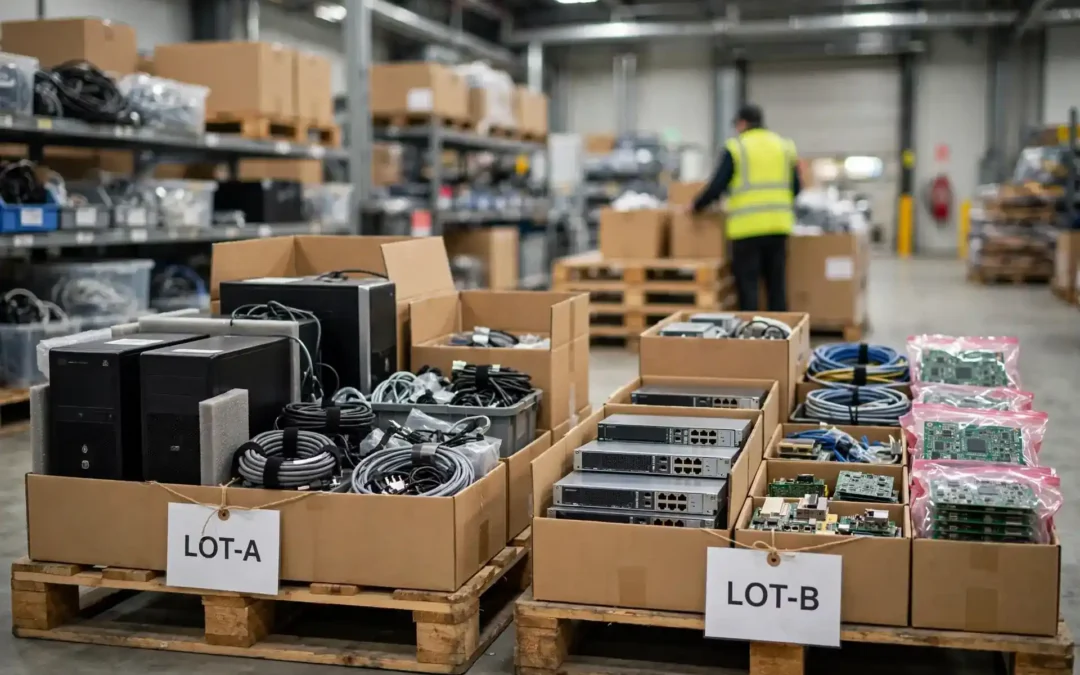
Quick answer: Divide a mixed electronics lot into clear equipment families, record make and model, flag data-bearing devices, isolate damaged batteries, and photograph the groups. Keep working resale candidates separate from scrap. Send the resulting inventory to a qualified buyer or recycler for review. Avoid dismantling gear or promising a value before the contents and condition are understood.
A mixed surplus electronics lot can hold useful equipment, recoverable components, and items that need responsible recycling. The fastest path to a clear evaluation is organized sorting. Start with safety and data, then group by equipment type, identity, condition, and completeness. A practical inventory gives buyers context while helping your team keep control of the disposition.
What counts as a mixed surplus electronics lot?
A mixed lot is a group of electronics collected from a business, plant, laboratory, school, hospital, or IT refresh. It may include computers, network switches, power supplies, circuit boards, test instruments, cables, controls, and unopened components. One pallet can contain assets with very different reuse, resale, and recycling paths.
The word “mixed” describes the presentation, not the material’s quality. Some items may be functional and identifiable. Others may be incomplete, obsolete, damaged, or missing accessories. A receiver should not have to guess which is which. Basic grouping makes the inventory easier to inspect and reduces back-and-forth questions.
For Phoenix-area organizations, the lot may come from a facility move, line change, warehouse cleanup, lab refresh, or recurring surplus review. This guide focuses on business material. Household recycling rules and drop-off programs can differ, so confirm the proper route for noncommercial loads.
Why sorting first improves the disposition decision
Sorting separates items that deserve evaluation for reuse from material that belongs in a recycling stream. It also identifies data-bearing assets before they leave the organization. These distinctions matter because a single mixed description such as “electronics pallet” hides the facts that affect handling, security, and buyer interest.
A detailed inventory does not guarantee a particular price or sale. It helps a buyer understand the lot and decide whether more information is needed. For the seller, it creates an internal record of what was released, who approved it, and which assets require separate handling.
A good process is proportional. A handful of devices may need a simple spreadsheet and a few photos. A multi-department liquidation may need numbered pallets, an asset export, and a named approval owner. Use enough detail to make the material traceable without turning sorting into an endless data-entry project.
Begin with a safe staging area
Choose a dry, stable area with enough room to separate categories. Keep aisles clear, avoid blocking exits, and use carts or pallets rated for the expected load. Do not stack unstable monitors, servers, or heavy equipment. Use normal workplace lifting procedures and ask for assistance with awkward items.
Keep liquids, loose debris, and unrelated waste away from the electronics. Do not open power supplies, displays, or battery packs as a shortcut to identification. Components can hold stored energy, and broken equipment may have sharp edges. If an item is leaking, swollen, hot, or visibly damaged, isolate it and ask a qualified safety contact how to proceed.
Battery condition deserves special attention. Set aside devices with swollen lithium-ion batteries, punctures, heat damage, or signs of leakage. Do not place damaged batteries in ordinary mixed bins. Follow your organization’s safety procedure and arrange an approved handling route. The EPA electronics donation and recycling guidance explains safe options for used devices.
A practical seven-pass sorting workflow
- Create broad groups. Separate computing and networking gear, industrial electronics, test equipment, components, circuit boards, cables, and unknown items. Keep unopened stock distinct from used equipment. Broad groups are enough at the start.
- Flag data-bearing assets. Servers, desktops, laptops, storage devices, network appliances, copiers, and some instruments can retain information or configuration data. Mark them for the company’s approved sanitization or destruction process before transfer.
- Capture identity. Record manufacturer, model, part number, serial number when practical, quantity, and any visible revision or option code. For small components, preserve the manufacturer label and packaging. Never cover a label with a handwritten mark.
- Note condition consistently. Use plain categories such as new sealed, used working, used untested, incomplete, damaged, or scrap candidate. Do not call an item working unless someone performed an appropriate functional check and recorded the basis.
- Group accessories with their parent equipment. Power cords, probes, rack rails, trays, manuals, and adapters can affect completeness. Put accessories in a labeled bag or box attached to the related asset group.
- Assign group or pallet IDs. A simple sequence such as LOT-A, LOT-B, and LOT-C is often enough. Put the same ID on the spreadsheet, pallet card, and photo filename. Keep the IDs visible without obscuring the original asset labels.
- Review the list with the equipment owner. Resolve obvious ownership, retention, data, export-control, warranty, or contract questions before the lot is released. Then ask the receiving buyer or recycler what additional detail they need.
Sort by equipment family before brand
Equipment family is the first useful cut because it describes function. A network switch, oscilloscope, PLC module, and laptop require different evaluation questions. Brands and model numbers refine the record after the broad family is clear.
Useful family labels include IT hardware, networking and telecom, industrial controls, test and measurement, electronic components, populated circuit boards, power equipment, cables, and accessories. Keep a “needs identification” group for devices with unreadable labels or unfamiliar assemblies. Guessing a model from appearance can mislead a buyer.
For industrial material, record the equipment’s relationship to a larger system when known. A standalone controller, drive, HMI, or I/O module may be easier to understand if you note the cabinet or line it came from. Do not include confidential process names or machine configurations in a public inventory.
Build a useful inventory without overworking it
A spreadsheet is usually sufficient for a first evaluation. Include group ID, broad category, manufacturer, model or part number, quantity, condition, completeness, and notes. Add serial numbers when your asset controls require them. Include location and a contact who can answer follow-up questions.
Use one row per model and condition where quantities are clear. If a box contains many distinct parts, list the contents separately when labels are legible. If exact counts would take unreasonable effort, state that the quantity is approximate. Clear estimates are better than false precision.
For components, capture the full manufacturer part number, package type, quantity, date or lot code when visible, and packaging condition. Keep reels, trays, tubes, and cut tape identified separately. Do not mix different part numbers in one bag just because the packages look similar.
For equipment, note whether power supplies, probes, rack ears, software media, or removable storage are included. A missing accessory should be stated plainly. A buyer can then ask whether it affects evaluation instead of discovering it after pickup.
Keep a copy of the source records. An asset-management export, purchase list, maintenance record, or material review list can help resolve identity. Share only information the organization is authorized to disclose. Remove passwords, network diagrams, customer data, and confidential production notes.
| Inventory field | What to record | Why it helps |
|---|---|---|
| Group ID | Pallet, box, or category identifier | Connects photos and records to physical material |
| Identity | Make, model, part number, revision | Supports accurate screening |
| Quantity | Count or clearly marked estimate | Prevents ambiguity about lot size |
| Condition | Sealed, working, untested, incomplete, damaged | Separates known facts from assumptions |
| Risk flags | Data storage, battery damage, unknown ownership | Prompts internal review before transfer |
Separate equipment for reuse from material for recycling
Reuse candidates should be intact, identifiable, and accompanied by credible condition information. That does not mean every item needs a bench test. It means the seller should distinguish “tested working” from “powers on,” “untested,” and “unknown.” Those labels describe different levels of evidence.
A device that is obsolete for your operation may still be useful elsewhere. Conversely, a newer item may have little practical resale interest if it is incomplete, locked, damaged, unsupported, or expensive to test. Age alone does not establish value.
Items that cannot reasonably be reused may still contain recoverable materials. Keep them organized by material family where the receiving processor requests it. Do not dismantle boards or remove metals unless the processor has instructed you and the work is safe, permitted, and economically sensible.
JHI describes evaluating surplus electronics and excess inventory for potential reuse or responsible recycling. Its live service pages explain the material categories it handles. Use the surplus electronics service overview to see whether your business lot fits the stated scope.
Protect data and confidential information
Sorting identifies where data risk may exist; it does not sanitize the device. Before releasing equipment, follow your written data-retention and sanitization policy. Identify storage media in servers, workstations, laptops, network appliances, copiers, and specialized systems. Some equipment may store credentials or configurations even without a conventional hard drive.
Keep assets with unresolved data under the control of the responsible IT or security team. Record the serial number or asset tag when required. Decide whether the organization will sanitize media, retain it, or use a documented destruction service. Confirm what evidence your auditor or contract requires.
Do not assume a factory reset removes every record. Different storage technologies and devices require different methods. The NIST media sanitization guidance is useful for organizations that need a formal, risk-based process. Choose the method that matches the media, information sensitivity, and applicable policy.
If electronics recycling is part of a broader IT retirement, keep asset tracking and media handling connected. JHI’s IT asset disposition information describes the related IT equipment and data handling services presented on its site. Ask the provider directly which records it can supply for your specific load.
Photograph the lot for an evaluation
Photos should answer practical questions. Take one wide view of each group, then closer images of labels, condition issues, and included accessories. Use bright, even light. Keep images sharp enough to read the part number. Avoid photographing access badges, customer names, whiteboards, or confidential screens.
Name files with the group ID and sequence number. For example, LOT-B-01 can show the pallet overview, while LOT-B-02 can show the equipment labels. This small convention saves time when a buyer asks about a specific group.
Photographs support but do not replace an inventory. A box may hide damaged or mixed contents. State whether pictures show all items or a representative sample. If the contents changed after the photo, update the buyer before arranging transfer.
Prepare different categories differently
- IT and networking equipment: Record model and condition. Identify drives and embedded storage. Keep rails, power supplies, and transceivers associated with the relevant units. Do not disclose network passwords or configuration files.
- Industrial controls: Group PLCs, drives, modules, HMIs, sensors, and cables by family. Note whether hardware is removed from service and whether accessories are included. Treat memory cards and configuration media as sensitive until reviewed.
- Test equipment: Include manufacturer, model, options, calibration status if documented, and accessories. State when calibration records are missing. Do not claim calibration or functional accuracy from a display powering on.
- Components: Preserve original labels and packaging. Keep part numbers and date or lot codes visible. Avoid mixing reels, trays, and partial quantities. Record moisture-sensitive packaging condition only when it can be observed reliably.
- Circuit boards and scrap: Identify whether boards are populated, bare, sorted, or mixed. Keep unknown assemblies separate. Do not represent a board as a specific grade unless a buyer’s grading method supports that classification.
- Cables and accessories: Sort by connector or use when practical. Separate clearly identified valuable accessories from generic mixed wire. Describe unknown bundles as unknown rather than assigning an unsupported category.
Common sorting mistakes and how to avoid them
- Mixing reusable products with scrap. A working instrument buried under broken cables becomes harder to evaluate. Keep the candidate in a separate, labeled group and show its actual condition.
- Using “tested” without a test description. State who checked it, when, and what was checked. If the test was simply visual inspection, say so. Accurate language earns trust and prevents disagreements.
- Removing labels to make the lot look tidy. Original labels preserve identity and traceability. Add a removable group label, but leave manufacturer labels intact.
- Packing batteries, damaged devices, and ordinary electronics together. Follow safety instructions and keep damaged batteries isolated. Ask the receiving facility about acceptance before transport.
- Assuming that all electronics have positive resale value. Condition, demand, completeness, testing cost, and logistics all matter. Ask for an evaluation instead of making an internal promise about proceeds.
- Releasing a lot before ownership and retention checks. Confirm that the department no longer needs the item and that no hold or contract restriction applies. If an item is leased, customer-owned, government-furnished, or export-controlled, stop and ask the authorized owner.
How a buyer evaluation typically works
A buyer first screens identity, quantity, condition, completeness, and likely handling requirements. The buyer may request clearer photos, a serial list, a closer count, or an inspection. The information requested depends on the category and the condition of the material.
The evaluation may separate resale candidates from recycling material. A lot can contain both. A proposed disposition should make clear which groups are being evaluated, what assumptions apply, and whether the buyer needs to inspect the material before confirming terms.
Ask for written clarity on accepted and excluded items, pickup or delivery responsibilities, data handling, title transfer, settlement basis, and any documentation. Do not assume a quote includes every item on a pallet unless the scope says so.
For Arizona businesses, JHI’s excess inventory management page describes its focus on industrial manufacturing excess and electronic material. Its electronics preparation guide also covers practical preparation topics. Review the current terms directly with the company before arranging a load.
A sample sorting scenario
Imagine a manufacturer consolidating a storeroom after a production change. The team finds network switches, controller modules, test instruments, bags of cables, loose circuit boards, and sealed component reels. Calling it one mixed pallet would hide important differences.
The team assigns six category IDs. It keeps storage-bearing network hardware with IT for data review. Controls are grouped by model family. Test instruments receive a condition note and accessory check. Components remain in their labeled packaging. Boards and cable bundles are kept apart from potential reuse candidates.
The team records known quantities, takes photos, and marks three control units as untested. It does not claim that the instruments work or that component packaging is compliant. The buyer can now evaluate each family and ask targeted questions.
This example does not predict value or buyer acceptance. It shows how disciplined grouping reduces ambiguity. The same method scales from one room to multiple sites by adding location and pallet identifiers.
Phoenix and Maricopa County planning notes
Local logistics can influence how you stage a lot. Confirm access hours, loading-dock rules, elevator use, parking, pallet dimensions, and whether a lift gate or other equipment is needed. These details help avoid last-minute delays, especially at occupied facilities.
Phoenix heat can affect storage conditions for some electronics and batteries. Keep material indoors when possible and follow the manufacturer’s handling directions. Do not leave battery-containing devices in direct sun or a hot vehicle. Ask a safety professional about any questionable battery condition.
Businesses across Maricopa County should confirm accepted material and pickup scope before loading. JHI lists its Phoenix address and contact details on its live contact page. Its business e-waste service page describes the stated service scope and inquiry path. Service availability and pickup details should be confirmed directly.
Release checklist for the person accountable
Before material leaves, verify that the inventory matches the physical groups. Confirm that all data-bearing devices have an approved route. Check battery flags and any safety concerns. Ensure that titles, ownership, and internal approvals are resolved.
Record the receiver, transfer date, group IDs, and any required documents. Save the approved quote or disposition instructions with the inventory. If the final load differs from the original list, document the change and obtain written acceptance.
After transfer, reconcile quantities and exceptions. Ask for the documentation promised in the agreement. Close out internal asset records only when your process permits. A tidy trail makes later audits and budget review easier.
Make condition language useful and consistent
Choose condition labels before the team begins. A small vocabulary keeps one department from calling an item “good” while another calls the same condition “untested.” Define each label in plain language and use it consistently across the file.
For example, “new sealed” should mean the original package is closed and visibly intact. “Used working” should identify what operation was checked and when. “Untested” means no functional test was performed. “Incomplete” should name missing parts when known. “Damaged” should describe visible damage without guessing its cause.
Do not let a condition label carry more meaning than the evidence supports. A green power light does not prove full operation. A clean enclosure does not show that internal boards are sound. A calibration sticker may be expired or unrelated to current accuracy. Record observable facts separately from conclusions.
If multiple people inspect a lot, assign one reviewer to normalize labels before submitting the inventory. This does not erase the original notes. Keep those notes in a comment or source column, then use the agreed category in the buyer-facing field.
This practice can prevent disputes later. The buyer can compare like items using the same vocabulary, and the seller can explain why an item was placed in a particular group. Clear limits are more credible than polished claims.
Account for time, space, and internal costs
The cheapest-looking disposition route is not always the least expensive overall. Staff time, temporary storage, security review, packing supplies, forklift time, dock access, and delayed space recovery all have operational costs. These costs may be more important than a small difference between preliminary offers.
Estimate the work required to prepare the lot. Count how many departments must review it, whether equipment needs to be de-racked, and whether the site requires special access. Identify any rooms or aisles that remain blocked while the material waits.
Use a practical comparison. Write down expected proceeds only when there is a real offer, then list known service costs, internal labor, freight, and the cost of holding the items. Avoid assigning made-up dollar values to uncertain environmental or compliance risk.
A simple decision record can explain why the organization selected one route. Note the alternatives considered, the approved scope, and the reason for the decision. This gives managers a useful record without pretending that every variable can be calculated precisely.
Phoenix warehouses may face seasonal heat and limited staging capacity. Plan indoor staging where possible. Avoid leaving electronics or batteries in direct sunlight while waiting for a truck. Include access and timing constraints in the evaluation request.
Keep a clean record from intake through closeout
Record which inventory version was sent for review and when it was sent. If a department later finds another box, do not silently add it to the original list. Create a revision, identify the added group, and ask whether the existing evaluation still applies.
Keep the original spreadsheet read-only after approval. Create a working copy for updates and mark each revision with a date and owner. This small habit prevents staff from confusing a draft list with the approved release list.
Store photos with the same group identifiers used in the inventory. Avoid vague filenames such as “electronics final.” A clear name lets the next reviewer find the relevant image without opening every file.
Document any item removed from the lot before pickup. If a manager retains a device, mark it as retained and update the packing list. The final receipt should represent what physically transferred, not what the first draft once included.
If an external buyer asks for sensitive details, consult the internal owner before sharing them. A seller can provide technical identity without disclosing credentials, customer records, proprietary process information, or restricted documents.
Choose the right level of sorting for the lot
A small cabinet cleanout may need only a few labeled groups. A large warehouse transfer may need pallet IDs, serialized assets, and a review meeting. Use the smallest process that still protects safety, data, ownership, and accurate evaluation.
Set a stopping point for sorting. If a team spends hours researching an unknown module, record the visible label and mark it for buyer identification. Do not let a few obscure items delay the entire lot.
For recurring material, save the category definitions and spreadsheet columns. Staff can reuse them during each inventory cycle. Repeated structure makes it easier to compare lots and see whether a category keeps accumulating.
If a location contains sensitive or controlled devices, sort only within the approved area. Do not move material to a public staging space or send identifying photographs before the responsible owner approves the transfer.
Finally, ask the receiving provider what information is actually useful. A buyer may prefer model-level counts for equipment and label-level detail for components. Tailor the next inventory using that feedback, while keeping the seller’s internal record complete.
Use a decision log for unusual items
Some items do not fit a standard category. A custom test fixture, retired prototype, or unidentified module may need review by engineering or the asset owner. Give it a temporary ID and record the person responsible for identifying it.
The decision log should state the question, evidence reviewed, decision, approver, and date. For example, it can record whether a fixture is company property, whether removable media was retained, or whether a prototype may be released.
Do not let uncertain items disappear into a general scrap box. Keep them physically separate until the authorized owner resolves their status. If the item remains unidentified, disclose that fact in the buyer inventory.
A decision log also helps future teams. When the same type of material appears again, staff can check whether a prior routing decision applies. They should still verify that the asset, contract, and policy context are the same.
Store the log with the inventory and approval record. Limit access if it contains customer, program, or security information. The buyer usually needs a clear disposition description, not internal deliberations.
Frequently asked questions
How should I start sorting a mixed electronics lot?
Start with broad equipment groups, then flag data-bearing devices and damaged batteries. Capture make, model, quantity, condition, and group ID.
Do I need to test every device before asking for an evaluation?
No. State what is known and mark untested items clearly. Do not imply a test occurred when it did not.
Should I remove hard drives before sending equipment?
Follow your organization’s media policy. Identify storage and agree on sanitization or destruction before transfer.
Can I put all circuit boards and cables in one box?
Keep distinct categories separate when practical. Mixed packing can obscure identity and make evaluation harder.
What photos help a buyer review a lot?
Provide wide group views, readable model labels, condition details, and accessories. Avoid sensitive screens and documents.
What should I do with swollen or damaged batteries?
Isolate them and follow your workplace safety procedure. Do not place them in ordinary mixed electronics bins.
Does sorting guarantee a higher offer?
No. Sorting improves clarity, but value depends on identity, condition, demand, completeness, and handling costs.
What should a written disposition proposal explain?
It should identify included groups, assumptions, excluded items, logistics, data handling, settlement basis, and documentation.
Conclusion
A mixed surplus electronics lot becomes easier to evaluate when the contents are visible, grouped, and described honestly. Sort by family, protect data, isolate damaged batteries, preserve labels, and record condition without guessing.
A simple, accurate inventory protects both the business and the receiving partner. It also helps your team make a defensible choice between reuse, sale, and recycling. Start with what you know, identify what needs review, and confirm the actual scope before releasing material.
Ready to discuss a business electronics lot?
Share your equipment categories, approximate quantities, and handling questions with JHI to discuss the next steps.