
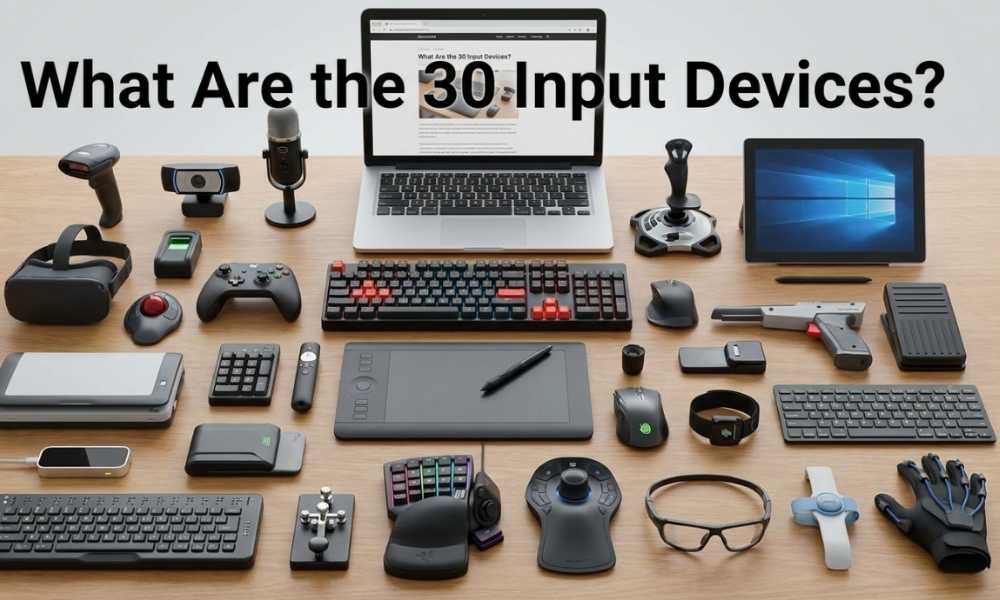
You’re using an input device right now. Whether you tapped a phone screen or clicked a mouse, you sent data to a machine. That’s what input devices do. They’re the bridge between you and your computer.
Most people know three: keyboard, mouse, and microphone. But the full list goes way deeper. There are input devices for gaming, medicine, music, security, and even your brain. This guide covers all 30, what they do, and why they matter.
By the end, you’ll know every major input device, which category it falls into, and how to pick the right one for your needs. Let’s get into it.
Table of Contents
- What Is an Input Device?
- The 30 Input Devices — Full List
- Input Devices by Category
- Why Input Devices Matter More Than You Think
- How to Choose the Right Input Device
- Input Devices and the Future of Computing
- Frequently Asked Questions
What Is an Input Device?
An input device sends data into a computer. It’s a piece of hardware that turns your actions into digital signals the system can read and respond to.
Think of it this way. Your computer is fluent in binary. You’re fluent in words, gestures, and movements. Input devices are the translators. They convert your physical actions into a language that machines understand.
Every time you press a key, swipe a screen, or speak a voice command, an input device is doing the work behind the scenes.
Input vs Output — the quick difference: Input devices send data to the computer (keyboard, mouse). Output devices send data from the computer to you (monitor, speakers). Some devices do both — like a touchscreen. Those are called I/O devices.
The 30 Input Devices — Full List
Here are all the major input devices you need to know. Each one has a job. Some are common. Some are specialized. All of them send data to a computer in some way.
1. Keyboard
The most widely used input device on the planet. You press keys and text or commands go into the system. Keyboards come in mechanical, membrane, and laptop styles — but they all work on the same core principle. Press a key, send a signal.
Best for: Writing, coding, data entry, and general computing.
2. Mouse
Moves a cursor on screen. Clicking, scrolling, and dragging let you control your computer without typing. Optical mice use light sensors to track movement. Older models used a physical rubber ball. Today’s gaming mice track at thousands of DPI for pixel-perfect precision.
Best for: Navigation, design, and general desktop use.
3. Touchscreen
Tap the screen and the device responds. Capacitive screens — like your smartphone — detect the electrical charge from your fingertip. Resistive screens respond to physical pressure. A touchscreen is both an input and an output device at the same time.
Best for: Phones, tablets, kiosks, and point-of-sale systems.
4. Microphone
Converts sound waves into digital audio data. Used for voice calls, recording, podcasting, and voice commands. Paired with speech recognition software, your voice becomes a full input method. Modern AI assistants rely entirely on microphone input.
Best for: Voice control, recording, and communication.
5. Webcam
Captures video and sends it to the computer in real time. Used for video calls, content creation, and facial recognition. Modern webcams support HD and 4K. They’re standard on laptops and can be added to desktops via USB.
Best for: Video conferencing, streaming, and security systems.
6. Scanner
Converts physical documents or images into digital files. Flatbed scanners are common at home. High-speed sheet-fed scanners process hundreds of pages per minute in office and hospital environments. OCR (optical character recognition) lets scanned text become editable.
Best for: Digitizing documents, archiving, and legal records.
7. Joystick
A stick that tilts in all directions to control movement on screen. Used in flight simulators, arcade games, industrial machines, and drone control. Many joysticks include buttons, triggers, and throttle wheels for complex control schemes.
Best for: Flight sims, arcade gaming, and industrial controls.
8. Gamepad / Controller
Handheld device with buttons, analog sticks, and triggers for gaming. PlayStation, Xbox, and Nintendo controllers are all gamepads. They send precise input signals to games dozens of times per second. Modern controllers also include haptic feedback motors.
Best for: Console and PC gaming.
9. Trackpad / Touchpad
A flat surface you slide your finger across to move a cursor. Built into every laptop. Supports multi-touch gestures like pinch-to-zoom, two-finger scroll, and three-finger swipe. Apple’s Force Touch trackpad even detects pressure level.
Best for: Laptop users and people working without a mouse.
10. Graphics Tablet (Digitizer)
A flat pad you draw on with a special stylus. Converts your hand movements into precise digital strokes. Artists and illustrators love these for pressure sensitivity — press harder and the line gets thicker. Wacom is the most well-known brand.
Best for: Digital art, illustration, and photo editing.
11. Stylus / Digital Pen
A pen-shaped device for touchscreens and tablets. More precise than a finger. Used for writing, sketching, and signing documents digitally. The Apple Pencil detects 4,096 levels of pressure and even tilt angle for natural-feeling strokes.
Best for: Note-taking, drawing, and digital signatures.
12. Barcode Reader
Scans barcodes and translates them into product or inventory data. Found in supermarkets, warehouses, hospitals, and post offices. Uses laser beams or cameras to read the pattern of lines. It’s fast, accurate, and requires zero typing.
Best for: Retail checkout, inventory management, and logistics.
13. QR Code Scanner
Reads 2D QR codes using a camera. Your smartphone camera does this natively. Used for payments, website links, contactless menus, and product tracking. QR codes hold far more data than traditional barcodes and can store URLs, contact info, and text.
Best for: Mobile payments, marketing, and contactless access.
14. Fingerprint Scanner
Reads your fingerprint and converts it into a unique digital signature. Used to unlock phones, laptops, and secure doors. Capacitive scanners map the ridges and valleys of your print. Once stored, your finger becomes your password.
Best for: Device security, access control, and authentication.
15. Retina / Iris Scanner
Scans the unique pattern in your eye to confirm your identity. Much harder to fake than a fingerprint or password. Used in high-security government facilities, airports, and some premium smartphones. Each person’s iris pattern is unique — even identical twins differ.
Best for: High-security access and identity verification.
16. Digital Camera
Captures images and transfers them to a computer. Modern cameras connect via USB, Wi-Fi, or Bluetooth. They’re input devices because they feed image and video data into your system for editing, storage, and sharing.
Best for: Photography, content creation, and videography.
17. Trackball
Like an upside-down mouse. You roll the ball with your thumb or fingers to move the cursor. The device itself stays completely still. Popular with people who have limited desk space or repetitive strain injuries. Used widely in medical imaging and CAD workstations.
Best for: Small workspaces and users managing wrist strain.
18. Light Pen
An older device that detects light from a CRT monitor screen. You draw or point directly on the screen surface. Mostly replaced by modern stylus and touchscreen technology. Still used in some legacy industrial and military systems.
Best for: Legacy systems and some specialized industrial applications.
19. MIDI Controller
A keyboard, pad, or instrument interface that sends musical data to a computer. Music producers use them to create beats, melodies, and arrangements. MIDI stands for Musical Instrument Digital Interface. The protocol is over 40 years old but still the standard in music production.
Best for: Music production, live performance, and sound design.
20. Steering Wheel (Gaming)
A wheel-and-pedal setup that mimics driving a real car. Used for racing simulators on PC and consoles. High-end models include force feedback motors so you feel road texture, grip loss, and collisions through the wheel. Brands like Logitech and Fanatec lead this category.
Best for: Racing simulation and driver training software.
21. Motion Sensor / Accelerometer
Detects physical movement and translates it into digital input. Built into smartphones, game controllers (like the Nintendo Switch Joy-Con), and fitness trackers. When you tilt your phone to steer in a game, that’s an accelerometer doing the work.
Best for: Mobile gaming, fitness tracking, and gesture-based controls.
22. Gesture Recognition Device
Reads hand or body movements through cameras or infrared sensors. No touching required. Used in smart TVs, VR systems, and accessibility tools. The Leap Motion controller tracks individual finger joints in real time. A game-changer for people who can’t use traditional devices.
Best for: Contactless control, VR, and accessibility.
23. Eye Tracker
Follows where your eyes are looking and uses that as input. Life-changing for people with severe physical disabilities who can’t use their hands. Also used in UX research to see what users actually look at on a screen. High-end versions can replace a mouse entirely.
Best for: Accessibility, UX research, and gaze-based gaming.
24. 3D Mouse (Space Mouse)
A 6-axis device for navigating 3D environments. Engineers and architects use it to rotate, pan, and zoom 3D models simultaneously. You can push, pull, tilt, and spin — all without switching between tools. 3Dconnexion makes the most popular models.
Best for: CAD design, 3D modeling, and engineering software.
25. VR Controller
Handheld devices for virtual reality experiences. They track hand position in 3D space and detect button presses with sub-millimeter precision. Meta Quest, PlayStation VR, and Valve Index all use them. The goal is making your virtual hands feel like your real ones.
Best for: Virtual reality gaming, training simulations, and immersive media.
26. Magnetic Stripe Reader
Reads data encoded in the magnetic stripe on credit and debit cards. Swiping the card sends your account information to the payment system. Still widely used globally despite newer chip and contactless alternatives. Point-of-sale terminals in millions of stores use these daily.
Best for: Payment processing and access card systems.
27. Smart Card Reader
Reads chips embedded in credit cards, ID cards, and SIM cards. Far more secure than magnetic stripes because the chip creates a unique code for every transaction. Used in banking, government ID systems, and secure building access worldwide.
Best for: Secure payments, government ID, and corporate access control.
28. Biometric Signature Pad
Captures not just the shape of your signature but how you write it. Pressure, speed, and pen angle are all recorded and stored. This makes digital signatures much harder to forge. Banks, courier companies, and legal firms use these for verified digital signing.
Best for: Legal document signing and identity-verified transactions.
29. Breath / Sip-Puff Controller
A tube-based input device controlled entirely by breathing. Blowing or sipping through the tube sends different input signals to a computer. Designed specifically for people with very limited physical mobility — such as those with ALS, spinal cord injuries, or paralysis. It’s a critical assistive technology device.
Best for: Assistive technology and severe mobility impairment.
30. Brain-Computer Interface (BCI)
Reads electrical signals from the brain and converts them into computer commands. Neuralink is the most talked-about example — it’s an implanted chip that lets patients control a cursor with their thoughts alone. Non-invasive EEG headsets are also available for gaming and research. In a 2023 clinical trial, a paralyzed patient typed at 40 words per minute using only brain signals. That’s not science fiction. That’s happening now.
Best for: Medical assistance for paralyzed patients and advanced research.
Input Devices by Category
Not all input devices work the same way. Grouping them helps you understand what each one is built for. Here’s how the 30 break down into clear categories.
Text and Data Entry
These devices send alphanumeric or structured data into a computer. They’re built for accuracy and speed.
- Keyboard
- Barcode Reader
- QR Code Scanner
- Smart Card Reader
- Magnetic Stripe Reader
Pointing and Navigation
These control cursor position or navigate a digital space. Precision is their superpower.
- Mouse
- Trackpad / Touchpad
- Trackball
- Touchscreen
- Stylus / Digital Pen
- Light Pen
- 3D Mouse (Space Mouse)
Audio and Visual Input
These capture what you say, show, or produce in the physical world and bring it into digital form.
- Microphone
- Webcam
- Digital Camera
- Scanner
Gaming and Simulation
Built for precision, speed, and immersion in interactive environments.
- Gamepad / Controller
- Joystick
- Steering Wheel
- VR Controller
- MIDI Controller
Biometric and Identity
These read your body as the input. Secure, personal, and impossible to forget at home.
- Fingerprint Scanner
- Retina / Iris Scanner
- Eye Tracker
- Biometric Signature Pad
- Sip-Puff Controller
- Brain-Computer Interface
Sensor-Based Input
These detect physical world data and translate movement or position into digital signals.
- Motion Sensor / Accelerometer
- Gesture Recognition Device
Specialized Design
Built for specific creative or professional workflows.
- Graphics Tablet (Digitizer)
Why Input Devices Matter More Than You Think
The device you use shapes how you work. A graphic designer using a keyboard shortcut instead of a graphics tablet loses hours every day. A warehouse worker with a barcode scanner processes ten times more items than one typing product codes manually.
The right input device removes friction. It makes your work faster, more accurate, and less tiring. That’s not a small thing. Over a career, it adds up to thousands of hours.
Input devices also change who can use technology at all. Sip-puff controllers and eye trackers give people with severe physical disabilities the ability to communicate, work, and create. A brain-computer interface let a paralyzed patient type at 40 words per minute in a clinical trial. That’s transformative — not incremental.
The Input Devices in Your Pocket
Your smartphone packs at least six input devices at once. It has a touchscreen, microphone, camera, fingerprint scanner, accelerometer, and a gyroscope. Most people don’t think of their phone as a bundle of input hardware. But that’s exactly what it is.
Modern laptops combine trackpads, keyboards, and webcams. Smart TVs add voice recognition and gesture sensors. Even a smart fridge now has a touchscreen input panel. Input devices are everywhere — constantly listening for your next move.
How to Choose the Right Input Device
Not every device works for every job. Here’s a simple framework to guide your decision.
Match the device to the data type
- Text and numbers? Start with a quality keyboard.
- Cursor movement? A mouse or trackpad covers most needs.
- Creative work? A graphics tablet with a stylus wins.
- Voice or audio? Invest in a good condenser microphone.
- Identity verification? Biometric devices are built for that.
- Physical products? Barcode scanners are the industry standard.
Consider your environment
Warehouse? Get durable handheld barcode scanners. Creative studio? Pair a MIDI controller with a high-quality microphone. Working on the go? A laptop’s built-in trackpad is just fine. Designing complex 3D models? Invest in a dedicated graphics tablet and a 3D mouse.
The environment dictates the device almost as much as the task itself. Don’t try to draw fine digital art with a mouse. Don’t use a light pen in a brightly lit room. Match the tool to the context, every time.
Think about long-term ergonomics
If you type eight hours a day, your keyboard matters enormously. Mechanical keyboards with proper tactile feedback reduce strain for many people. Vertical mice reduce wrist rotation. A trackball keeps your arm still and relaxed. Small choices compound over years into real health outcomes — both good and bad.
Ergonomics tip: Repetitive strain injuries affect millions of office workers worldwide. Choosing the right input device isn’t just a productivity decision. It’s a long-term health decision too.
Input Devices and the Future of Computing
The way we interact with computers is changing faster than most people realize. For decades, the keyboard and mouse were the only real options for most users. That era is ending.
Voice input is mainstream now. Millions of people use Alexa, Siri, and Google Assistant daily. Natural language processing has become accurate enough that voice is a reliable input method for searches, reminders, and smart home control.
Gesture control ships in every VR headset and many smart TVs. Eye tracking is built into some high-end laptops. Neuralink’s brain chip has let human patients control computers with their thoughts. These aren’t concepts on a whiteboard. Their products are available today.
AI is also changing the equation. Predictive text, autocomplete, and AI-generated code all reduce how much raw input you need to provide. The gap between “what you intend” and “what the computer does” is shrinking fast. In the future, less raw input will produce more output.
The convergence trend: Tomorrow’s input devices will combine multiple modalities. Voice plus gesture. Eye tracking plus hand tracking. Neural signals plus voice confirmation. One device reading several signals at once. The goal is zero-friction communication between human and machine.
Frequently Asked Questions
What is the most common input device?
The keyboard is the most widely used input device in the world. Nearly every computer, laptop, tablet, and smartphone has one in some form — physical or on-screen.
Is a touchscreen an input or output device?
Both. A touchscreen is an I/O (input/output) device. It displays content as an output and accepts touch gestures as an input — at the same time. It’s one of the few devices that performs both functions simultaneously.
Is a microphone an input device?
Yes. A microphone converts sound waves into a digital audio signal and sends that data into the computer. That’s a classic input function. Output devices play sound back — a microphone only captures it.
What input devices are used in gaming?
Gaming relies on gamepads, joysticks, steering wheels, VR controllers, keyboards, and mice. Motion sensors and eye trackers are growing in this space too. Professional esports players pay close attention to input device specs because milliseconds matter in competitive play.
What input devices are used in healthcare?
Healthcare uses barcode scanners for medications and inventory, biometric devices for patient identification, microphones for voice dictation, and in cutting-edge applications, brain-computer interfaces for patients with neurological conditions. Eye trackers are also used to help patients with locked-in syndrome communicate.
Will keyboards become obsolete?
Unlikely in the near future. Voice, gesture, and neural input are all growing rapidly — but keyboards remain the fastest and most precise text input tool available. They’ll stay essential for writing, coding, and professional work for a long time to come.
What is the newest type of input device?
Brain-computer interfaces are the newest category reaching real-world use. Neuralink and similar companies are developing implants that let people control computers directly with brain signals. Non-invasive EEG headsets are also commercially available for gaming and accessibility applications right now.
What is the difference between an input device and an output device?
An input device sends data to the computer, like a keyboard or microphone. An output device receives data from the computer and presents it to you — like a monitor or speaker. Devices like a touchscreen do both, making them I/O (input/output) devices.
The Bottom Line
Input devices are the starting point of every interaction you have with a computer. From the humble keyboard to a neural implant that reads your thoughts — they all serve the same core purpose. They translate you into something a machine can understand.
The 30 input devices in this guide span everything from everyday tools to cutting-edge technology. Some you use every day without thinking. Others are reshaping what’s possible for people who couldn’t access computers before.
Knowing what these devices are and how they work makes you a smarter tech user. It helps you pick the right tools for your work. And it gives you a window into where computing is heading next.
The list of input devices isn’t fixed. New ones are being developed right now. But the principle stays the same. You act. The device listens. The computer responds. That loop is the foundation of everything digital.
Ready to Clear Your Electronic Surplus the Smart Way?
You now know all 30 input devices — what they are, how they work, and which category they belong to. That knowledge matters. Whether you’re a student, a tech buyer, or a business managing IT assets, understanding input hardware helps you make smarter decisions.
At Jay Hoehl Inc., we’ve been in the electronics industry since 1980. We’ve seen every input device, circuit board, and piece of surplus hardware you can imagine. And when those devices reach end-of-life, we make sure they don’t end up in a landfill.
We buy, recycle, and responsibly dispose of surplus electronics — from obsolete servers and test equipment to excess inventory and e-scrap. We serve businesses of all sizes across Phoenix, AZ, and we’re BBB A+ rated for a reason.
Every piece of surplus electronics your business holds has value. We give you a fast, fair, and environmentally compliant way to recover that value. No guesswork. No wasted space. Just professional service from a team that’s been doing this longer than most of the industry.
45+ years in electronics surplus management
Trusted by Phoenix businesses for decades
Data destruction included with all services
Prompt payout. Any volume. No obligation.
Get a Free Evaluation of Your Surplus Electronics
One call. No obligation. We handle any volume — from a single obsolete device to a full warehouse of excess inventory. Phoenix’s trusted electronics recycler since 1980.
📍 3334 W McDowell Rd Unit 17, Phoenix, AZ 85009-2414