
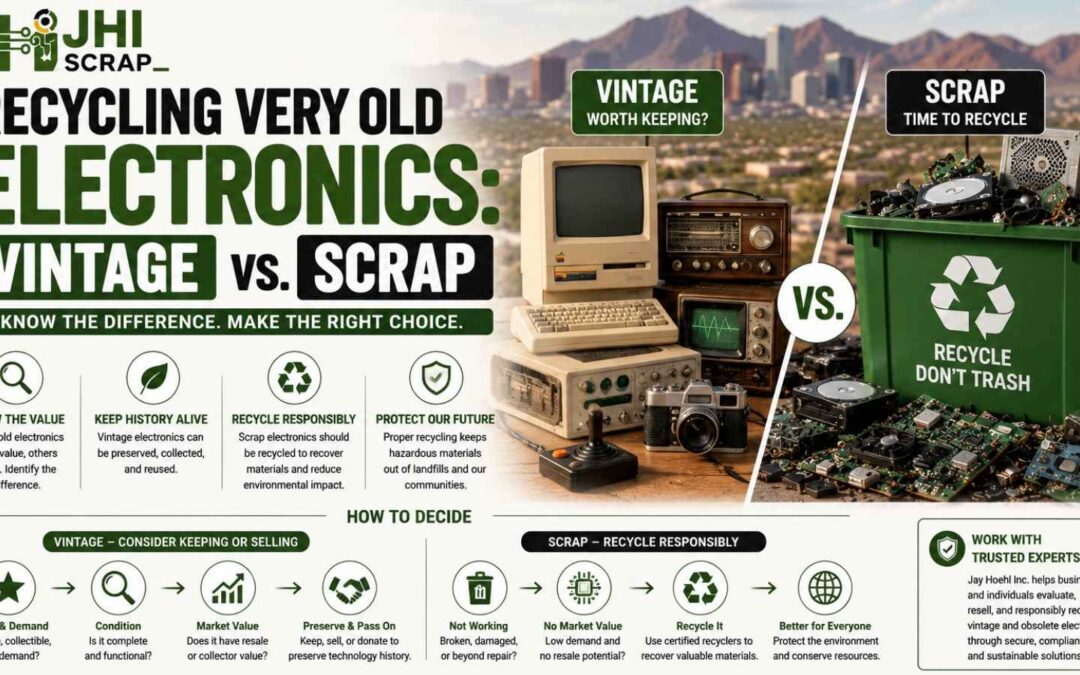
Recycling Very Old Electronics: Vintage vs Scrap
Very old electronics should not go straight into a scrap pile. Some pieces deserve appraisal, reuse, repair, or careful resale first.
Others have little collector demand. They may contain damaged batteries, broken glass, stored data, or unsafe parts. Responsible recycling becomes the better path for those items.
The difference rarely comes down to age alone. Brand, model, condition, rarity, completeness, demand, and safety all matter.
That dusty receiver may be a time capsule. The beige computer beside it may be common scrap. Looks can fool you.
Phoenix homes and businesses often store old electronics for years. Garages, warehouses, schools, offices, and estate cleanouts can hide surprising pieces.
Desert heat adds another concern. Batteries can swell. Plastics can become brittle. Dust can settle inside vents and switches.
Should you sell that old machine, donate it, keep it, or recycle it?
This guide gives you a practical answer. You will learn what collectors notice and when scrap makes sense.
You will also learn safe handling, data protection, pricing, pickup steps, and local recycling questions.
Start With the Short Answer
Start by checking identity, demand, condition, completeness, safety, and stored data. That six-point review prevents valuable pieces from becoming scrap.
In the Valley, people know not to judge a book by its sun-faded cover. Old electronics deserve the same pause.
Use this quick order.
- Identify the manufacturer, model, version, and approximate era.
- Photograph labels, ports, accessories, cases, and visible damage.
- Check recent sold examples, not hopeful asking prices.
- Ask whether safe testing requires a qualified technician.
- Protect any personal, business, or customer data.
- Choose sale, donation, parts recovery, or responsible recycling.
Think of the choice as a three-lane road. Vintage resale is one lane. Parts reuse is another. Material recycling is the last.
A working piece can still lack market demand. A broken piece can still contain rare, useful parts.
Do not assume heavy means valuable. Large cabinets, steel frames, and bulky televisions can carry high handling costs.
Never assume old means harmless. Some equipment can retain electrical charge or contain damaged power components.
If you remain unsure, stop and ask a specialist. A few photos can prevent a costly mistake.
What Makes an Electronic Item Vintage?
An electronic item becomes vintage when history, design, scarcity, or community demand gives it lasting interest. Age helps, but age does not guarantee value.
Every old dog has its day, even under the Phoenix sun. Yet collectors choose some models and ignore many others.
A vintage computer is an older system now viewed as obsolete. Collectors may preserve, display, repair, or use those machines.
The same idea reaches beyond computers. Radios, amplifiers, cameras, consoles, instruments, and test equipment can attract dedicated buyers.
Vintage interest often grows from several traits.
- The model changed how people worked, played, listened, or communicated.
- Production was limited, regional, short, or tied to a major brand.
- The design has a strong visual style or unusual technology.
- Accessories, packaging, manuals, or software survived with the unit.
- A repair community still shares parts, guides, and technical knowledge.
- Museums, collectors, studios, or hobbyists still seek the item.
An ordinary office computer may be old without becoming collectible. Millions of similar units may still exist.
Condition also changes the answer. A rare model with major corrosion may interest a parts buyer. A complete example may attract a restorer.
Do not clean away labels, stamps, signatures, or original finishes. Those details can help confirm identity and history.
Vintage value is a market question, not a sentimental promise. Your memories matter, but buyers still compare supply and demand.
Put Safety Before Testing
Safety comes before any attempt to power, open, clean, or repair very old electronics. Unknown equipment should stay unplugged until you understand its risks.
Look before you leap, especially when Phoenix heat has baked something for years. Storage conditions can change a device quietly.
Old power supplies, capacitors, cords, insulation, and batteries may fail. Dust, pests, water, corrosion, and past repairs can add danger.
Treat stored energy like a loaded spring. The device may look quiet while a hazardous charge remains inside.
Do not open televisions, monitors, microwave equipment, or high-voltage gear without proper training. CRT equipment can present shock and glass hazards.
Watch for warning signs.
- Swollen, leaking, cracked, or unusually hot batteries.
- Frayed cords, missing plugs, exposed conductors, or melted insulation.
- Burn marks, sharp odors, soot, or scorched circuit areas.
- Broken glass, cracked CRTs, or loose internal parts.
- Heavy rust, white residue, green corrosion, or water stains.
- Unknown modifications, jumper wires, bypassed fuses, or open panels.
Do not use a household extension cord for an uncertain test. Never test near paper, fuel, fabric, or dry outdoor material.
Avoid aggressive cleaning. Compressed air can spread dust and contamination. Liquids can enter switches, transformers, and porous parts.
Ask a qualified repair technician about valuable equipment. The testing fee may protect both the item and your safety.
For low-value damaged equipment, testing may add risk without adding value. A recycler can often accept it unpowered.
Identify the Make, Model, and Version
Accurate identification is the foundation of every vintage-versus-scrap decision. Small model differences can change demand, parts, and value.
The devil is in the details, from downtown Phoenix to the East Valley. One letter can mark a different production run.
Search for information on these areas.
- Front and rear badges.
- Bottom, back, or side labels.
- Serial number plates.
- Chassis stamps or cabinet markings.
- Model numbers near power entries.
- Labels inside removable battery covers.
- Names on manuals, cases, boxes, or accessories.
Photograph the complete item before moving anything. Then take close images of every label and connector.
Write down exactly what you see. Do not guess missing letters or add a popular model name.
For computers, note the processor family, memory markings, drives, expansion cards, and keyboard. Keep those parts together.
For audio equipment, note channel count, tube markings, matching speakers, and cabinet condition. Avoid removing tubes without a plan.
For test equipment, record measurement range, modules, probes, fixtures, manuals, and calibration stickers. Specialized accessories may hold real value.
Serial numbers can help estimate production order. They can also help track business assets and possible ownership issues.
Do not publish every serial number online. Share enough for identification while protecting ownership and privacy.
If labels are missing, use shape, port layout, controls, and internal boards carefully. Collector groups may recognize unusual features.
Learn What Collectors Usually Want
Collectors usually want rare, complete, identifiable, original, and restorable electronics. Demand rises when the item tells a clear story.
Strike while the iron is hot in the Phoenix market. Collector interest can change as generations revisit familiar technology.
Common value signals include these traits.
- A known brand with an active collector community.
- A first generation, unusual revision, or limited production model.
- Original boxes, manuals, cables, remotes, software, and cases.
- Clean labels and an unmodified cabinet.
- A proven history from a school, studio, lab, or company.
- Working functions that a careful test can demonstrate.
- Replacement parts and repair knowledge that remain available.
Originality matters, but repairs do not always destroy value. A documented professional repair can improve buyer confidence.
Unexplained changes create doubt. Cut wires, drilled cabinets, modern switches, and missing boards can reduce demand.
Completeness can matter more than appearance. A scratched computer with its keyboard and manuals may beat a polished bare unit.
Provenance helps unusual items. Photos, invoices, inventory records, and service notes can show where the equipment worked.
Do not invent a story. Honest uncertainty protects your reputation and the buyer.
Collector value also depends on shipping. Fragile, heavy, and oversized items may attract buyers only near Phoenix.
Local pickup can protect CRTs, large speakers, racks, and lab instruments. It can also avoid difficult packaging costs.
Check These Categories Before Scrapping
Several old electronics categories deserve a careful value check before recycling. Strong communities often support repair, parts, display, and reuse.
One person’s trash can be another person’s treasure in the Valley. Still, every category has common low-value items too.
Vintage Computers and Game Systems
Vintage computers and game systems can attract collectors when they are identifiable and complete. Keyboards, controllers, disks, boxes, and manuals matter.
Old-school never goes fully out of style around Phoenix. Nostalgia can support demand for recognizable systems.
Check desktop computers, early laptops, home computers, terminals, consoles, handhelds, and unusual peripherals. Look for matching power supplies.
Avoid plugging an unknown system into modern displays or power sources. Wrong adapters can damage rare hardware.
Keep software, disks, cartridges, and documentation together. Those items can explain the machine and strengthen a listing.
Audio Gear and Radios
Vintage audio gear can hold value through sound, design, tubes, transformers, and brand reputation. Receivers, amplifiers, turntables, and radios deserve review.
The old saying fits here. Good things can come in heavy packages.
Cabinet damage may lower value without ending demand. Internal corrosion, burned transformers, and missing controls create larger problems.
Matching knobs, faceplates, tubes, manuals, and speakers can matter. Do not polish printed markings away.
Cameras, Projectors, and Video Equipment
Old cameras and video equipment can interest collectors, prop buyers, schools, and artists. Lenses and accessories may outvalue the main body.
A picture can be worth a thousand words, especially in a Phoenix listing. Clear photos show condition better than broad claims.
Check lens markings, mounts, batteries, cases, cables, viewfinders, and film formats. Remove leaking batteries only when safe.
Many common camcorders and projectors have weak demand. Rare formats, professional gear, or complete kits may perform better.
Test Equipment and Industrial Electronics
Old test equipment can retain value through parts, research, training, or specialized production needs. Age alone does not end usefulness.
Do not throw the baby out with the bathwater in an industrial cleanout. One module may support an older production line.
Review oscilloscopes, signal generators, meters, analyzers, controls, modules, sensors, and communication equipment. Note every included probe and fixture.
Calibration status, operating range, manuals, and service history can matter. Unknown condition should be stated honestly.
The surplus electronics market is different from normal consumer resale. Specialized buyers may understand equipment that general marketplaces overlook.
Sort Items Into Four Practical Conditions
Condition should be described with evidence, not hopeful labels. Use four practical groups for very old electronics.
Call a spade a spade in the Valley. Clear condition notes save time, returns, and arguments.
Working and Safely Tested
Working means the listed functions were tested safely and performed as described. It does not mean every hidden part is perfect.
Record who tested the unit, when, and how. List any missing functions, noise, drift, display problems, or heat.
Untested
Untested means exactly that. The item was not powered or evaluated. It does not mean working.
This label is often best for unknown equipment. A buyer may prefer an untouched unit over a risky power test.
Repairable or Restoration Candidate
A restoration candidate has visible problems but remains complete enough for skilled work. Demand depends on parts and community support.
Describe cracks, corrosion, missing pieces, and prior repairs. Do not promise a simple fix without proof.
Parts or Scrap
Parts units can still help restore similar equipment. Scrap units have little realistic reuse demand or safe parts value.
Separate those terms. A broken rare control panel may sell for parts. A crushed common printer may belong in recycling.
Know When Scrap Is the Better Choice
Choose scrap when safe reuse, repair, parts demand, and sale value do not justify handling. Responsible recycling still recovers useful materials.
When in doubt, do not keep kicking the can down McDowell Road. Delays can worsen batteries, corrosion, and storage costs.
Strong scrap signals include these conditions.
- Severe water, fire, pest, or chemical damage.
- Crushed cabinets, broken boards, or missing major assemblies.
- Swollen batteries that require special handling.
- Broken CRT glass or unsafe high-voltage damage.
- Common models with no realistic buyer interest.
- Heavy equipment whose handling exceeds likely value.
- Devices that cannot meet safe or useful needs.
- Items blocked from resale by ownership or compliance rules.
Do not strip every wire or board at home. Informal dismantling can create sharp edges, dust, broken glass, and mixed waste.
Keep equipment intact unless a qualified recycler asks for separation. Complete units are easier to identify and route.
Some recyclers charge for difficult items. CRTs, televisions, batteries, and large printers may require specialized work.
Ask about fees before loading the vehicle. A clear item list helps the recycler give a useful answer.
The Phoenix e-waste recycling guide explains local disposal paths. Use it when collector options do not fit.
Estimate Value Without Fooling Yourself
Fair value comes from recent completed sales, real condition, included accessories, and realistic costs. Asking prices alone do not prove demand.
A bird in the hand still matters in Phoenix. A local fair offer may beat months of storage.
Use this value check.
- Search the exact model and version.
- Filter for sold or completed examples when possible.
- Match condition, completeness, region, and accessories.
- Subtract marketplace fees, packing, shipping, and returns.
- Consider testing, cleaning, storage, and labor costs.
- Compare local pickup demand with national demand.
One rare sale does not set every price. Study several examples and note how long they took.
Heavy gear can cost more to ship than buyers expect. Fragile equipment may need custom foam or a crate.
Untested equipment usually sells below verified working equipment. Honest listings reduce disputes and protect repeat buyers.
Avoid phrases like museum quality unless the condition truly supports them. Photos and records carry more trust.
For an estate or business load, individual listing may take too long. A bulk buyer may offer lower prices but faster removal.
Consider your goal. Maximum price, fast space recovery, low effort, and safe handling can point toward different choices.
If the item seems unusual, get a second opinion. A collector, technician, auction specialist, or surplus buyer may spot hidden value.
Choose Between Selling, Donating, and Recycling
Choose selling for demand, donation for useful community value, and recycling for true end-of-life equipment. Each path needs proof and preparation.
Do not put all your eggs in one basket across Maricopa County. Mixed collections often need more than one destination.
Sell when the item has active demand and manageable risk. Photograph it well and describe every known issue.
Donate when a school, nonprofit, museum, club, or training program wants the exact item. Call before delivering.
Recycle when the equipment is unsafe, unwanted, incomplete, or beyond reasonable repair. Use a responsible electronics recycler.
JHI’s guide to selling or donating working used electronics explains local options. It also covers preparation and data concerns.
For mixed business inventories, a surplus buyer can evaluate reuse and material value together. That can reduce extra handling.
Ask every recipient what happens next. A donation should not transfer disposal costs to a small organization.
Keep records for valuable, data-bearing, donated, or business-owned equipment. Record the item, recipient, date, and final path.
If you want a quick review, request a free evaluation from JHI. Share clear photos, model numbers, quantities, and location details.
Protect Data on Very Old Electronics
Very old electronics can still hold readable personal, business, customer, or research data. Age does not erase storage media.
The buck stops with the owner, even after a Phoenix pickup. Protect the information before transfer whenever possible.
Check these devices for storage.
- Desktop and portable computers.
- Servers, terminals, and network appliances.
- Hard drives, tapes, disks, and memory cards.
- Copiers, printers, scanners, and fax systems.
- Cameras, recorders, phones, and personal organizers.
- Test systems with internal drives or removable media.
Do not assume an old format is unreadable. Collectors, technicians, and recovery services may have compatible hardware.
Back up data you must keep. Confirm legal holds, retention rules, and company ownership before wiping anything.
Use a method that matches the media and risk. Old magnetic disks, solid-state storage, tapes, and embedded memory need different approaches.
Deleting files is not the same as secure sanitization. Formatting may also leave recoverable information.
Broken equipment can block software wiping. Physical media destruction may fit some high-risk cases.
Do not destroy rare storage hardware before checking historical value. Remove the media when safe, then document the decision.
Businesses should keep asset tags, serial numbers, transfer records, and destruction records. Ask vendors what documentation they provide.
Handle Batteries, CRTs, and Other Hazards
Batteries, CRTs, damaged glass, and old power components need separate attention. Never hide hazardous pieces inside a general scrap box.
Better safe than sorry is more than a saying in Phoenix heat. Poor battery storage can turn a cleanup into an emergency.
Watch batteries for swelling, leaks, cracks, heat, odors, or corrosion. Isolate questionable devices from normal inventory.
Protect battery terminals when required. Follow recycler guidance for containers, labeling, and transport.
The EPA electronics donation and recycling guidance warns against trashing lithium-ion batteries. It also recommends separate battery handling when appropriate.
CRT televisions and monitors contain heavy glass assemblies. They can be difficult, costly, and hazardous to move.
Do not lift a large CRT alone. Use suitable equipment and enough trained people.
Avoid laying fragile equipment where it can roll, fall, or break. Secure it during transportation.
Old capacitors and power sections can retain dangerous charge. Do not open or dismantle unknown high-voltage equipment.
Tell the recycler about broken glass, leaking batteries, water damage, and contamination. Surprise hazards can stop a pickup.
For lab or industrial equipment, identify chemicals, oils, radiation sources, or biological contact. Specialized clearance may come first.
Understand What a Recycler Does Next
A responsible recycler evaluates reuse, parts, data, hazardous components, and material recovery. The process should match the item’s real condition.
All that glitters is not gold, even inside an old circuit board. Value comes from several materials and reuse paths.
Typical steps include these actions.
- Receive, weigh, count, or inventory the equipment.
- Separate data-bearing assets and special hazards.
- Test suitable items for possible reuse.
- Remove reusable components or valuable modules.
- Dismantle equipment through controlled processes.
- Sort metals, boards, plastics, glass, and batteries.
- Send materials to approved downstream processors.
- Provide reports, certificates, or payment when agreed.
Not every recycler performs each step in one building. Ask which work happens locally and which partners receive material.
The article on what happens to your electronics explains reuse, donation, data safety, and recycling. It gives useful context before pickup.
Vintage screening should happen before destructive processing. Tell the recycler when a load may contain collectible or specialized equipment.
Ask whether the vendor buys surplus electronics. Some recyclers focus only on material, while others have reuse networks.
Clear expectations protect both sides. Put testing, data work, fees, rebates, reports, and ownership transfer in writing.
Understand Pricing, Fees, and Recovery
Pricing depends on equipment mix, condition, quantity, labor, transport, hazards, data work, and resale demand. No single rate fits every vintage load.
There is no free lunch in the Valley. Valuable pieces may offset costs, but difficult items can carry fees.
Common fee drivers include these factors.
- CRT monitors, televisions, and broken displays.
- Damaged or mixed batteries.
- Stairs, long carries, elevators, and limited loading access.
- Heavy racks, consoles, copiers, and industrial cabinets.
- On-site packing, sorting, inventory, or dismantling.
- Data wiping, physical destruction, or detailed certificates.
- Small loads far from normal service routes.
Recovery value may come from working equipment, reusable parts, rare models, components, and metals. Market conditions change.
Ask how the recycler calculates net value. Fees, freight, testing, sales costs, and revenue shares should be clear.
Do not accept a vague promise that everything has value. Some old electronics cost more to handle than they return.
Provide accurate photos and counts. Separate obvious hazards, but do not over-sort without guidance.
Get the quote in writing. Confirm what can change the price on pickup day.
For large collections, ask whether individual high-value items can be evaluated separately. Bulk pricing may hide unusual pieces.
Prepare for a Phoenix Pickup or Drop-Off
Good preparation protects people, equipment, data, and the quoted price. Inventory the load before moving it.
Measure twice and move once around Phoenix. Narrow halls, hot loading areas, and heavy CRTs punish poor planning.
Use this preparation list.
- Count items by category and condition.
- Photograph valuable, fragile, heavy, or damaged equipment.
- Record model and serial numbers when needed.
- Flag data-bearing devices and removed media.
- Separate damaged batteries with recycler guidance.
- Confirm stairs, gates, docks, parking, and elevators.
- Keep accessories with possible vintage items.
- Confirm packing, labor, fees, and timing in writing.
Do not leave electronics outdoors before pickup. Direct sun and heat can worsen batteries, plastics, screens, and adhesives.
Secure the load from public access. This step matters for business devices and valuable collector pieces.
For drop-off, call first. JHI’s Phoenix site serves the public by appointment only.
Business hours are Monday through Friday, 8:00 a.m. to 4:30 p.m. Confirm current acceptance and appointment details.
The address is 3334 W McDowell Road, Unit 17, Phoenix, Arizona 85009-2414.
Large cleanouts may need a planned pickup. Share the building type, access route, quantities, and unusual weights.
Use one site contact during removal. That person can answer questions and approve documented changes.
Choose a Recycler Who Can See More Than Scrap
Choose a recycler who can evaluate reuse, surplus value, data risk, hazards, and material recovery. Very old electronics need wider judgment.
Know before you go in Maricopa County. A few direct questions can prevent poor routing and surprise costs.
Ask potential recyclers these questions.
- Do you evaluate vintage, reusable, and surplus equipment?
- Which electronics do you accept?
- Which items carry fees?
- Can you handle batteries, CRTs, and heavy equipment?
- How do you protect data-bearing devices?
- What happens to reusable items and parts?
- Which downstream processors receive materials?
- Do you provide pickup, packing, or inventory services?
- Which reports or certificates will we receive?
- How are rebates, payments, and final fees calculated?
Look for clear answers, written scope, and realistic limits. A trustworthy recycler will not promise value without seeing the load.
Certifications can support environmental and data controls. Verify the certification scope and facility when those signals matter.
Local experience also helps. Phoenix routes, summer heat, industrial sites, and appointment rules affect real projects.
JHI Scrap has served Arizona organizations since 1980. The company handles surplus electronics, industrial e-scrap, IT assets, and value recovery.
Request a free evaluation before moving the collection. Photos and item details make the first conversation easier.
Avoid Common Vintage-versus-Scrap Mistakes
Most mistakes come from rushing, unsafe testing, weak identification, or unrealistic pricing. A simple review prevents them.
Haste makes waste, especially during Phoenix estate and warehouse cleanouts. Slow down around unusual labels and accessories.
Avoid these errors.
- Scrapping every item because it looks old or dirty.
- Calling every old item rare or valuable.
- Plugging unknown equipment into power without review.
- Opening CRTs or high-voltage equipment without training.
- Throwing accessories, manuals, software, or cases away.
- Cleaning off labels, markings, or original finishes.
- Pricing from active listings without checking sold examples.
- Hiding damage or calling untested equipment working.
- Shipping fragile equipment without proper materials.
- Forgetting drives, tapes, disks, and stored data.
- Mixing swollen batteries with normal electronics.
- Donating unusable equipment to avoid recycling fees.
Another mistake is dismantling first. A complete unit may have more reuse value than loose boards.
Do not delay dangerous items while researching common pieces. Isolate hazards and contact a recycler promptly.
Keep a maybe pile, but set a deadline. Endless research can turn a cleanup into another storage problem.
Ask one knowledgeable person for uncertain items. Then choose a path and document it.
Questions People Ask About Very Old Electronics
These answers cover the questions that delay most vintage and recycling decisions. Use them before calling buyers or recyclers.
In the Valley, a little knowledge goes a long way. Clear facts make every next step easier.
How old must electronics be to count as vintage?
No fixed age creates vintage value. Historical importance, rarity, design, demand, and community interest matter more.
Some recent devices become collectible quickly. Many much older devices remain common and unwanted.
Are all tube radios and amplifiers valuable?
No. Brand, model, condition, tubes, transformers, cabinets, and buyer demand change the answer.
Do not power unknown tube equipment without review. A qualified technician can assess safer testing.
Are old computers worth money?
Some old computers attract collectors, especially complete or unusual models. Matching keyboards, software, boxes, and manuals help.
Common incomplete systems may have limited value. Data protection still matters before sale or recycling.
Should I plug in old electronics before selling them?
Only when safe testing is appropriate and you understand the equipment. Unknown cords and power sections can fail.
An honest untested listing may be safer. Valuable gear may justify professional inspection.
What does untested mean in a listing?
Untested means no reliable functional test was completed. It does not mean the seller expects it to work.
Describe visible condition separately. Buyers need clear facts about damage, completeness, and storage.
Can broken vintage electronics still have value?
Yes. Rare boards, controls, tubes, transformers, cases, knobs, and manuals can support restoration.
Parts value depends on demand and condition. Severe corrosion or damage can remove that value.
Should I remove parts before recycling?
Usually, keep the unit complete until a buyer or recycler gives guidance. Dismantling can reduce reuse value.
It can also create sharp edges, dust, broken glass, and battery risks.
What should I do with an old CRT television?
Do not open, break, or lift a large CRT alone. Call a recycler and ask about fees.
Collector demand varies by model and use. Gaming communities may want some working displays.
Can I donate very old electronics?
Yes, when a recipient specifically wants and can safely use them. Call first and describe the item honestly.
Do not transfer broken equipment or disposal costs without agreement.
How do I protect data on an old computer?
Back up needed files, identify the media, and use an approved sanitization method. Deletion alone may not work.
Businesses should follow security, legal, and recordkeeping rules. Broken drives may need physical destruction.
Are electronics recycling pickups free in Phoenix?
Some loads may qualify for low-cost or no-cost pickup. Equipment mix, volume, distance, labor, and value matter.
Ask for written pricing. Confirm CRT, battery, packing, data, and access charges.
Can a recycler buy vintage or surplus electronics?
Some recyclers also buy surplus, test, industrial, or reusable equipment. Others focus only on material recovery.
Ask before pickup. Send photos, model numbers, quantities, and condition details.
How should I store old electronics while deciding?
Use a clean, dry, secure, temperature-controlled area. Keep items away from direct sun and water.
Separate damaged batteries. Protect fragile glass and keep accessories with their units.
Make the Best Next Move
The best path preserves useful history, protects people and data, and recycles true waste responsibly. Start with identity and condition.
The early bird gets the worm under the Phoenix sun. Collector value can fall as parts disappear or damage spreads.
Check labels, accessories, demand, and safety. Keep rare or complete items intact. Describe untested equipment honestly.
Sell pieces with real demand. Donate items that recipients truly want. Route parts units to qualified buyers.
Recycle common, unsafe, damaged, or unwanted electronics through a responsible provider. Keep batteries and CRTs clearly identified.
The reward is more than reclaimed space. You may preserve history, recover value, protect privacy, and avoid improper disposal.
Ready to learn whether your old electronics are vintage, reusable, or scrap?
JHI can evaluate surplus electronics and industrial e-scrap in Phoenix. The team can also discuss pickup, data needs, and recycling.
Request a free evaluation or schedule a pickup. Call (602) 272-4033 before visiting the appointment-only location.