
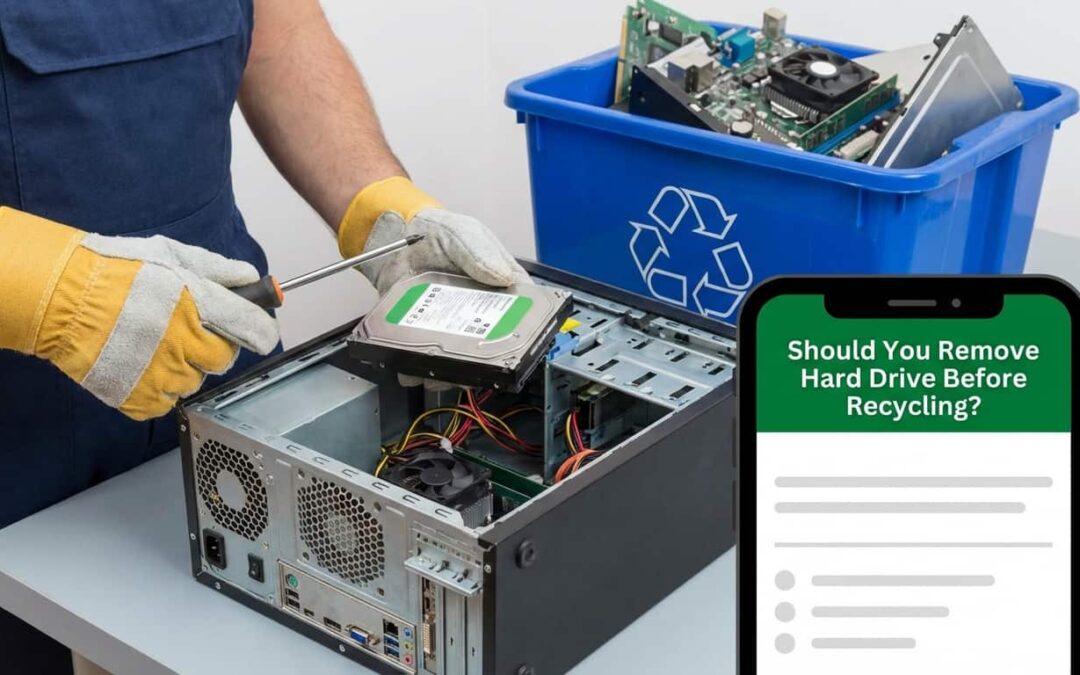
Should You Remove the Hard Drive From a Computer Before Recycling?
Yes. You should always remove the hard drive before recycling a computer.Most people think deleting files or wiping their desktop is enough. It’s not. Your hard drive still holds every password, bank login, photo, and document you’ve ever saved. Even after you empty the trash.Recycling centers don’t always erase drives before reselling parts. Buyers can access everything in minutes with the right software.
The safest move? Pull the drive out yourself. Or hire a certified service to destroy it physically. That’s the only way to guarantee your data stays yours.Your computer might be old. But the information inside it? Still valuable to identity thieves, hackers, and data brokers.
Why Old Computers and Hard Drives Hold Value in Phoenix, AZ
Your old laptop might feel worthless to you. But someone else sees opportunity.Recyclers resell working parts. Scrappers harvest metals like gold and copper from circuit boards. Refurbishers restore machines for resale. And data recovery specialists? They dig for personal information they can sell or exploit.Phoenix has a growing electronics recycling market. Local businesses buy, refurbish, and resell old computers every day. Some are legitimate. Others cut corners on data security.
Even broken computers hold value. Hard drives can survive drops, water damage, and years of neglect. The data inside often remains intact and accessible.That’s why removal matters. You’re not just tossing junk. You’re handing over a storage device filled with years of digital history. Unless you take it out first.
Why Hard Drives Contain Sensitive Personal and Financial Information
Your hard drive remembers everything. Browser passwords. Tax returns. Medical records. Bank statements.Most people save files without thinking about where they go. Your computer stores them automatically in folders you might not even know exist.Cached browser data holds login credentials. Downloaded PDFs contain account numbers. Photos include location metadata. Even deleted emails can stick around in local archives.This isn’t paranoia. It’s how computers work. Everything you do leaves a digital footprint. And that footprint lives on your hard drive until someone physically destroys it.
Stored Banking, Password, and Login Details
Think about what you’ve typed into your computer. Credit card numbers. Social Security details. Email logins. Streaming service passwords.Browsers offer to save this information for convenience. You probably said yes dozens of times without realizing it. Those saved passwords live in plain text files on your drive.Have you ever downloaded a bank statement? Filled out an online form with your address? Logged into PayPal or Venmo? All of that data still exists somewhere on your hard drive. Even if you think you deleted it.One recovered password can unlock your entire digital life. Is that risk worth skipping hard drive removal?
Personal Files, Photos, and Confidential Documents
Your family photos aren’t just memories. They’re data. And they reveal more than you think. Faces. Names. Locations. Dates. Every image you’ve saved tells a story about your life. Work documents contain business strategies, client lists, and proprietary information. Maybe you wrote personal journal entries. Scanned legal documents. Saved medical test results. These files feel private because they are. But they’re not protected once your computer leaves your hands. Imagine a stranger scrolling through your photo library. Reading your tax returns. Viewing your résumé. That discomfort? That’s why you remove the drive first.
Data Security Risks Before Selling or Recycling Electronics in Phoenix, AZ
Recycling feels responsible. But it comes with real security risks if you skip proper data protection.Phoenix electronics recyclers handle thousands of devices every month. Not all of them prioritize data destruction. Some focus on speed and volume over security protocols. Your computer might get resold as-is. Or stripped for parts. Or sent overseas for processing. Each step creates another opportunity for someone to access your hard drive. Even certified recyclers make mistakes. Drives get mixed up. Employees cut corners. Equipment malfunctions. The only foolproof protection is removing the drive yourself before the computer ever leaves your possession. This isn’t about questioning recyclers’ intentions. It’s about taking control of your own data security. No one cares about your privacy more than you do.
Data Can Still Be Recovered From Old or Broken Computers
A cracked screen doesn’t protect your data. Neither does a dead battery or a computer that won’t boot up. Think of your hard drive like a filing cabinet. Even if the desk around it collapses, the files inside stay intact. The drive operates independently from the rest of your computer. Data recovery tools can extract information from drives that seem completely dead. Professionals use specialized software to rebuild corrupted files. Damaged sectors get bypassed. Deleted data gets reconstructed.
You could throw your laptop off a roof. The screen would shatter. The case would crack. But there’s a good chance someone could still read your hard drive if they wanted to. Physical damage to the computer isn’t the same as physical destruction of the drive. That’s a critical distinction most people miss.
Risk of Identity Theft and Data Breaches
Identity theft doesn’t require sophisticated hacking. Sometimes it just takes finding the right discarded computer. One exposed Social Security number can open credit cards in your name. A recovered tax return provides everything needed to file fraudulent returns. Saved passwords unlock email accounts that control password resets for every other account you own. Data breaches happen when personal information reaches unintended hands. Your recycled computer is a potential breach waiting to happen. Every piece of data on that drive is leverage for someone with bad intentions. Protection isn’t paranoia. It’s basic digital hygiene. You lock your front door. You shred bank statements. Removing your hard drive before recycling is the same logic applied to electronics.
Why Deleting or Reformatting a Hard Drive Is Not Enough in Phoenix, AZ
Here’s the truth most people learn too late. Deleting files doesn’t actually delete them. When you drag a file to the trash and empty it, your computer just removes the reference to that file. The actual data stays on the drive. It’s like ripping the table of contents out of a book. The chapters still exist. You just removed the index. Reformatting sounds more secure. But standard formatting does almost the same thing. It creates a new file system without overwriting the old data underneath. Recovery software can reverse both actions in minutes. Free tools available online can scan a “clean” drive and restore thousands of deleted files. It’s not even difficult. It’s designed to be user-friendly. If you want real deletion, you need specialized software that overwrites every sector multiple times. Or you need physical destruction. Anything less is just hiding the table of contents.
Deleted Files Are Often Recoverable
Deleted doesn’t mean gone. It means hidden. Your operating system marks deleted file space as available for new data. But until something actually overwrites that space, the original data remains fully intact.Recovery takes minutes with the right software. Programs scan for data fragments and piece them back together. Photos, documents, videos all recoverable unless deliberately overwritten. Even tech-savvy people get this wrong. Deletion feels permanent. But it’s really just the first step in a longer process your computer handles invisibly.
Reformatting Does Not Permanently Erase Data
Reformatting feels like starting fresh. Clean slate. New beginning. But quick format options the default on most systems don’t touch your actual data. They rebuild the directory structure and move on. Your files stay exactly where they were.Full formatting is better. But even that doesn’t guarantee complete data erasure. Professional recovery services can often retrieve data from formatted drives.
The only true erasure involves multiple overwrite passes using military-grade software. Or physical destruction. Everything else leaves traces behind.
Why You Should Remove a Hard Drive Before Recycling a Computer in Phoenix, AZ
Removing the hard drive gives you complete control. No uncertainty. No hoping the recycler follows proper protocols. No trusting strangers with your digital life. Once the drive is out, you can destroy it yourself. Take it to a certified shredding service. Keep it as backup storage. The choice is yours. Recyclers can still process the rest of your computer without the drive. They’re primarily interested in the case, screen, motherboard, and other components anyway. The hard drive is usually worth more to you than to them. This one step eliminates nearly every data security risk. No recovered passwords. No stolen photos. No identity theft from your old electronics.
Better safe than sorry isn’t just a saying. It’s a strategy.
Preventing Unauthorized Access to Stored Data
Unauthorized access happens quietly. You won’t know until damage is done. Someone buys your old computer at a thrift store. They’re curious. They boot it up or pull the drive. Suddenly they have access to years of your digital footprint. Maybe they’re not malicious. Maybe they just find it. But “not malicious” doesn’t mean “secure.” Curiosity is enough reason for people to dig through old drives. Removal blocks this entirely. No drive means no data to access. Simple physics beats complex security protocols every time.
Ensuring Complete Data Protection
Complete protection requires complete removal. Nothing else comes close. Software solutions depend on proper execution. You can forget steps. Make mistakes. Miss hidden partitions. Human error creates vulnerability. Physical removal is binary. Either the drive is there or it isn’t. There’s no in-between. No room for user error beyond forgetting to do it entirely. You control the entire process. You see the drive in your hand. You decide what happens next. That certainty is worth the five minutes it takes to remove it.
Why Physical Hard Drive Removal Is Important Before Recycling in Phoenix, AZ
Physical removal beats software solutions every single time. Software can fail. Settings can be misconfigured. Programs can crash midway through. You might think you’ve erased everything when you’ve barely scratched the surface. But physical separation? That’s foolproof. The drive can’t be accessed if it’s not in the computer. Period. Phoenix electronics recyclers see hundreds of computers with “erased” drives that still contain recoverable data. They see far fewer with the drives physically removed. That’s because removal actually works. It’s also faster. Secure software erasure can take hours or days depending on drive size. Removal takes minutes with a screwdriver.
Why Physical Destruction Is the Most Secure Data Protection Method in Phoenix, AZ
Physical destruction is the gold standard. Nothing else offers the same guarantee. Think of it like burning documents versus just scratching out text. Scratching leaves recoverable information. Burning leaves ash. Professional destruction services use industrial shredders that turn drives into confetti-sized pieces. Degaussers scramble magnetic fields beyond recovery. Crushers pulverize platters into fragments.
Here’s how destruction methods compare:
- Drilling holes: Good but not perfect. Data can survive between holes.
- Hammering: Better than nothing. Still leaves large fragments.
- Industrial shredding: Excellent. Creates pieces smaller than fingernails.
- Degaussing: Excellent for magnetic drives. Scrambles data at the particle level.
You can destroy drives yourself if you’re careful. But professional services guarantee complete destruction and often provide certificates of data destruction for compliance purposes.
It’s the only method where recovery becomes physically impossible. No software can rebuild shredded metal.
Steps to Take Before Recycling a Computer in Phoenix, AZ
Follow these steps for maximum security. Don’t skip any.
Back up files you want to keep. External drives and cloud storage are both good options. Verify the backup worked before proceeding.
Sign out of all accounts. Email. Social media. Streaming services. Banking apps. Everything.
Remove the hard drive. Use a screwdriver to open the case. Locate the drive bay. Disconnect cables. Unscrew mounting brackets. Lift the drive out.
Decide on drive disposal. Keep it as backup storage. Destroy it yourself with a hammer and drill. Or hire a certified destruction service.
Deregister the computer from your accounts. Apple ID. Microsoft account. Any device-linked licenses. This prevents activation locks.
Remove external accessories. USB drives. SD cards. SIM cards. Anything that stores data.
Clean the case if donating. Wipe down surfaces. Remove stickers. Make it presentable for the next user.
Then recycle the rest of your computer with confidence. The valuable data is already safe.
What to Do If You Cannot Remove the Hard Drive in Phoenix, AZ
Some computers make hard drive removal nearly impossible. Soldered storage. Proprietary designs. Security screws you don’t have tools for. Don’t panic. You still have options. Use data destruction software designed for permanent erasure. DBAN and Eraser are free options. Run them multiple times. This overwrites every sector until recovery becomes impractical. Or find a professional. IT service companies and electronics recyclers in Phoenix offer secure data destruction. They’ll either remove the drive for you or destroy it while it’s still in the computer. Some services will come to your location. Others accept drop-offs. Ask about certifications and data destruction policies before handing over your device. When in doubt, prioritize security over convenience. A little extra effort now prevents major headaches later.
How to Remove the Hard Drive Before Recycling a Computer in Phoenix, AZ
Hard drive removal sounds technical. It’s actually straightforward.
For laptops: Turn off and unplug the computer. Flip it over. Find the hard drive bay cover. It’s usually a small rectangular panel with one or two screws. Remove screws. Slide or lift out the drive.
For desktops: Unplug everything. Open the case by removing side panel screws. Locate the drive cage. It’s typically near the front. Disconnect two cables from the drive. Unscrew mounting brackets. Slide the drive out.
Some newer laptops use M.2 SSDs. These are small cards that plug directly into the motherboard. Remove the single screw holding it down. Pull it out at an angle. Search your computer model plus “hard drive removal” online. You’ll find videos and step-by-step guides specific to your device. Don’t force anything. If it’s not coming loose easily, double-check for screws or clips you might have missed.
See How We Can Solve Your Hard Drive Destruction Needs in Phoenix, AZ
You’ve removed the drive. Now what? We specialize in secure hard drive destruction for Phoenix residents and businesses. Our industrial shredders reduce drives to fragments smaller than your thumbnail. Every piece is unrecoverable. We provide certificates of destruction for compliance and peace of mind. You can watch the destruction happen. Or we can pick up drives from your location.Secure your data the right way. Contact us today for certified hard drive destruction services.
Final Tip
Protecting your data is protecting yourself. Remove the drive. Destroy it properly. Then recycle the rest. One small action prevents years of potential problems.
Service Areas
We serve Phoenix and surrounding areas including Scottsdale, Tempe, Mesa, Glendale, and Chandler. Same-day service available for large volumes.
Contact
Ready to secure your data? Call Jay Hoehl Inc at (602) 272-4033 or visit jhiescrap.com.
We’re located at 3334 W McDowell Rd Ste 17, Phoenix, AZ 85009. We’ll walk you through every step and answer all your questions.