
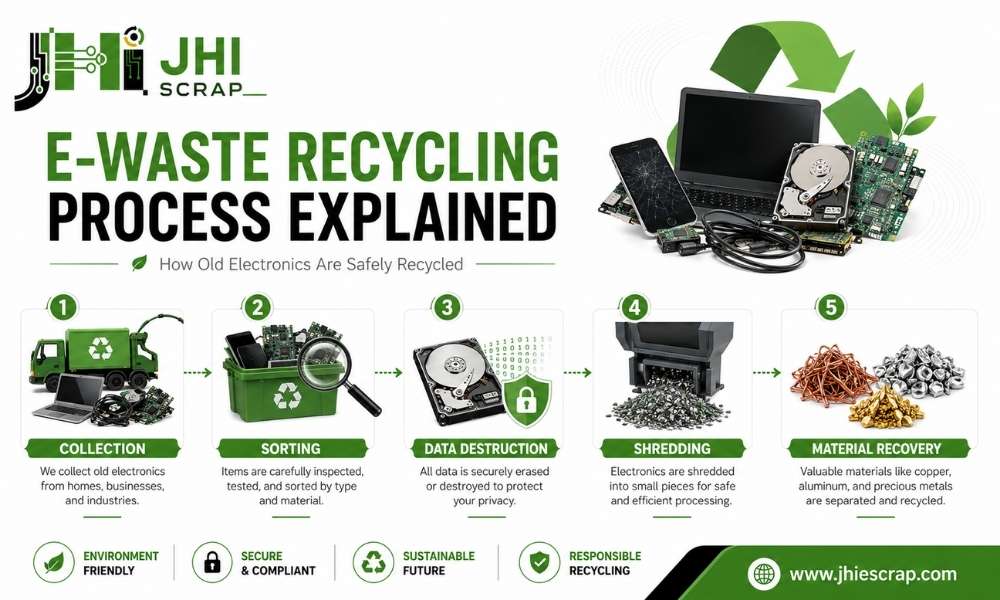
E-Waste Recycling Process Explained How Old Electronics Are Safely Recycled
You drop off an old laptop. Then what? Most people picture a giant shredder and nothing else. The real e-waste recycling process is far more careful than that. Before a phone, laptop, or server becomes raw material again, it goes through a surprisingly detailed journey. This guide walks you through every step. By the end you’ll know what happens to your electronics, why it matters, and how Phoenix electronics recycling keeps your data and the planet safe.
What Is E-Waste Recycling?
E-waste recycling is the process of recovering valuable materials and safely handling hazardous parts from old electronics. It’s how end-of-life devices get a second purpose instead of a spot in a landfill.
E-waste is not ordinary garbage. It is not ordinary scrap. It holds valuable materials and real hazards at the same time. That mix is exactly why it needs a process of its own.
Simple Definition of E-Waste
E-waste is any discarded electronic device or component. Think anything with a plug, a battery, or a circuit board. Once a device stops working, becomes outdated, or gets replaced, it becomes electronic waste. That includes obsolete gadgets, broken hardware, and the gear you stopped using years ago.
Common Examples of E-Waste
You probably have at least one outdated device sitting in a drawer right now. E-waste shows up in homes and offices alike:
- Laptops and desktops
- Phones and tablets
- Servers and networking gear
- Printers, monitors, and copiers
- Cables, chargers, and batteries
Some of this gear still holds value as surplus electronics or working parts long before recycling is the answer.
Why E-Waste Is Different From Regular Trash
Throwing electronics into regular trash is like tossing a toolbox full of valuable materials and hazardous substances into the same bin. You lose the good stuff and you release the bad stuff.
Old devices can contain lead, mercury, and lithium batteries. Those don’t belong in a landfill. They can leak into soil and water over time. At the same time, the same devices carry copper, gold, and aluminum worth recovering. Regular trash treats all of it as waste. Recycling treats it as risk to manage and value to recover. Learn more about the environmental impact of e-waste.
Why Is E-Waste Recycling Important?
Don’t dig a well when you’re already thirsty. Managing e-waste before it becomes a problem is far easier than cleaning up environmental damage later. Recycling old electronics protects the planet, recovers resources, and keeps your private data out of the wrong hands. Here’s why each reason carries real weight.
It Keeps Hazardous Materials Out of Landfills
Electronics hide toxic materials. Lead, mercury, and battery chemicals can seep into the ground if they’re dumped. Proper recycling pulls those hazards out and handles them under strict rules. The result is cleaner soil, cleaner water, and a smaller footprint for your old gear.
It Recovers Valuable Metals and Materials
Old electronics are tiny treasure chests. A single device can hold gold, silver, copper, and palladium in small amounts. Multiply that across thousands of devices and the value adds up fast. Ever wonder how much gold is in a ton of e-waste? The numbers surprise most people.
It Reduces the Need for Mining New Raw Materials
Mine less. Recover more. Every gram of copper we pull from old electronics is a gram we don’t have to dig out of the earth. Recovered metals feed straight back into new products. That cuts mining, saves energy, and keeps the supply chain moving in a loop instead of a straight line to the dump.
It Protects Personal and Business Data
What happens if an old hard drive leaves your control without being properly destroyed? That’s the risk nobody talks about.
Old phones, laptops, and drives still hold logins, client records, and personal files. A factory reset alone may not clear all of it. Certified recyclers solve this with proper data destruction, both software wiping and physical shredding. For businesses, this is often the single most important reason to recycle the right way. If you’re unsure whether your reset worked, here’s how to verify a hard drive wipe.
E-Waste Recycling Process Explained Step by Step
Here’s the part most people never see. E-waste recycling is a controlled, multi-stage process, not simple disposal. Devices get sorted, secured, taken apart, broken down, and refined into clean materials. The shredding stage is important, but it is not where the most valuable recovery happens. Let’s walk through it step by step. For a deeper look, see our guide to e-waste recycling methods and process.
Step 1: Collection and Drop-Off
That old laptop in your closet often begins its recycling journey with a simple drop-off. Devices enter the recycling stream a few ways:
- Drop-off at a recycling facility
- Public collection events
- Scheduled business pickups
The goal is easy access. The simpler the start, the more devices stay out of the trash. Not sure where to begin? Here’s where to get rid of old computer equipment near you.
Step 2: Safe Storage and Initial Inspection
Once devices arrive, the work starts before any machine turns on. Certified recyclers log incoming gear, tag it, and track it. This is called chain of custody. Each device gets recorded so nothing goes missing. Data-bearing items get flagged for extra care. This intake step builds the trust the rest of the process depends on.
Step 3: Sorting by Device Type and Material Risk
Not every device is processed the same way. Not every material carries the same risk. Sorting decides the path each item takes.
Workers separate devices by type and by hazard level. Batteries, CRT screens, and mercury components get pulled aside for special handling. A clean laptop and a leaky battery cannot ride the same line. Smart sorting keeps workers safe and recovery rates high.
Step 4: Data Destruction for Computers, Phones, and Storage Devices
What happens if sensitive information remains on a discarded hard drive? Certified recyclers make sure it doesn’t.
Storage devices get one of two treatments, and often both:
- Software wiping overwrites the data so it can’t be read.
- Physical destruction shreds the drive into pieces.
The method gets documented, so you have proof the job was done. This is where a real recycler earns your trust. Curious whether your own reset is enough? Read does a factory reset delete everything.
Step 5: Manual Dismantling and Reusable Part Removal
Before anything hits the shredder, skilled hands take devices apart. Workers pull out parts that still have life. Memory, drives, cards, and clean components often get recovered for reuse. Many reusable parts hold higher value intact than as raw material. Removing them first means less waste and more recovered value from every device.
Step 6: Shredding Into Smaller Pieces
Now the shredder earns its place. What’s left of each device gets broken into small, uniform pieces. This size reduction sets up everything that comes next. Smaller pieces mean cleaner separation and better recovery. Once shredded, the real separation process begins.
Step 7: Magnetic Separation
Magnets act like powerful filters that pull steel from mixed material streams. As shredded material moves along, strong magnets grab the ferrous metals, mainly steel and iron. This single step recovers large amounts of metal quickly and cleanly. The magnetic pile heads off for refining while the rest moves on.
Step 8: Eddy Current Separation for Non-Ferrous Metals
Next comes a clever trick. Eddy current separators use spinning magnetic fields to repel non-ferrous metals like aluminum and copper. These metals literally jump off the line into their own stream. It looks like magic, but it’s physics. This step lifts metal recovery rates well beyond what magnets alone can manage.
Step 9: Water, Air, and Density Separation
Materials separate much like heavier rocks sink while lighter leaves float. After the metals are out, what remains is a mix of plastics, glass, and other bits. Recyclers use water baths, air jets, and density sorting to split them. Heavy pieces drop. Light pieces lift or float. Each material lands in its own clean stream, ready for the final stage.
Step 10: Refining, Smelting, and Material Recovery
Yesterday’s waste becomes tomorrow’s resource. Recovered metals head to refiners and smelters. There they get purified back into usable commodities. Gold, copper, aluminum, and steel re-enter manufacturing as raw material for new products. Plastics and glass move to their own recovery streams. This is the moment old electronics stop being scrap and become supply again. Recovered chips and boards can even fuel semiconductor recycling.
Step 11: Responsible Disposal of Non-Recyclable Residue
Even certified recyclers generate small amounts of residue. Some material can’t be recovered with today’s technology. A responsible recycler sends that leftover to proper, compliant disposal, not a random dump. Being honest about this last step is a sign of a recycler you can trust. To see what falls into this group, read what e-waste is not recyclable.
What Materials Are Recovered From E-Waste?
Most people underestimate what’s hiding inside their old gear. A dead laptop isn’t junk. It’s a bundle of metals, minerals, and parts waiting for a second life. Material recovery is one big reason e-waste recycling powers the circular economy. Here’s what comes back out.
Precious Metals
Many people are surprised to learn that old electronics can contain small amounts of gold and silver. Circuit boards, connectors, and chips carry tiny traces of:
- Gold
- Silver
- Platinum and palladium
One device holds little. A truckload holds a fortune. Ever wondered how many SIM cards make one gram of gold? The answer says a lot about hidden value.
Base Metals
The workhorses of recovery are the everyday metals. Copper is often one of the most commonly recovered materials, pulled from wires, coils, and connectors. Aluminum and steel come out in bulk too. These metals are easy to recover and always in demand, which makes them a reliable payoff in every batch.
Critical Minerals
Some of the materials recovered from e-waste help power the technologies of tomorrow. Devices hold rare earth elements and battery materials that modern tech depends on. These are getting harder to mine and more valuable each year. Recovering them from old electronics eases the strain on fresh supply and keeps key minerals in circulation.
Plastics and Glass
Not all plastics have equal recycling value. Some plastic casings and components get recovered and reprocessed. Others are tougher to handle. Glass from screens and panels gets separated too, though older display glass needs special care. Recyclers sort these streams to recover what they can and handle the rest responsibly.
Reusable Components
Waste not, want not. Reusable components often have a second life before recycling ever becomes necessary. Memory modules, drives, and working boards get pulled for reuse or resale. A part that still works is worth far more whole than shredded. This is why smart recyclers harvest reusable pieces first and recycle the rest. The same logic drives the market for surplus test equipment.
What Happens to Hazardous E-Waste Materials?
Many readers worry that batteries, mercury, and toxic parts just end up in a landfill. That fear is fair, and it’s worth answering directly. Certified recyclers use specialized handling for the dangerous stuff. These materials cannot be ignored. These materials cannot be processed like ordinary waste. Here’s how each one gets managed.
Lithium-Ion Batteries Are Handled Separately
What happens if a damaged battery gets crushed during processing? It can spark, swell, or catch fire. That’s why batteries never ride the normal line.
Recyclers pull lithium-ion batteries out early and store them in safe, fire-resistant containment. Damaged batteries may need extra care before transport. From there they go to facilities built to recover their materials safely. Handled right, a risky battery becomes recovered metal instead of a hazard.
CRT Monitors and Older TVs May Contain Leaded Glass
Older CRT screens may look harmless on the outside, but they can hold materials that need careful treatment behind the glass. Many old televisions and monitors contain leaded glass, sometimes several pounds of it. You can’t toss that in a normal recycling stream. Trained handlers separate the leaded glass and route it to specialized processors. It’s a slow, careful job, and that care is exactly the point.
Mercury-Containing Components Require Special Care
Some older electronics and lighting parts contain mercury even when they look ordinary. Mercury is toxic and easy to release if mishandled. Certified recyclers identify these parts, isolate them, and send them to facilities equipped for safe mercury handling. The goal is simple. Keep a known toxin away from people, water, and air across the whole Phoenix community.
Toner, Ink, and Printer Components May Need Separate Processing
Even something as small as a printer cartridge may need a completely different recycling path. Toner, ink, and printer parts don’t recycle like circuit boards. They get separated and processed on their own track. Many printer makers also run take-back programs for used cartridges, which makes responsible disposal even easier.
Reuse, Repair, Refurbishment, and Recycling: What Comes First?
Here’s a truth that surprises people. Recycling isn’t always the first move. There’s a smarter order that squeezes the most value out of every device before it ever gets broken down. Master this hierarchy and you waste less, save more, and make better calls. Waste not, want not.
Reuse Is Usually Better Than Recycling
Reuse before recycling. Extend before replacing. A device that still works holds far more value whole than as raw material. Before you recycle, ask if someone else can use it. A working laptop can serve another user for years. You might even sell old electronics in Phoenix instead of scrapping them.
Refurbishment Extends Product Life
Sometimes a device just needs a little love. A new battery, a wiped drive, a fresh setup, and it’s good to go again. Refurbishment turns a tired device into a working one. Many business machines can be refreshed and redeployed inside the same company. That stretches budgets and keeps gear out of the recycling stream a while longer.
Recycling Is Best for Broken or End-of-Life Electronics
You may have a device that’s too old to repair but too important to throw away. That’s exactly when recycling shines. Once repair is no longer practical or worth the cost, recycling recovers the materials inside and handles the hazards safely. It’s the right choice for true end-of-life gear, and a key part of any IT refresh cycle.
Disposal Is the Last Resort
Recover when possible. Recycle when necessary. Dispose only when unavoidable. Disposal sits at the bottom of the ladder for a reason. It recovers nothing. Certified recyclers work hard to pull out value first and shrink what’s left to the smallest possible amount. Disposal is what happens after everything else has been tried.
How Businesses Should Handle E-Waste Recycling
For a business, e-waste isn’t just clutter. It’s compliance, security, and accountability rolled into one. A single forgotten hard drive can turn into a data breach or a failed audit. Here’s a clear checklist to handle retired electronics the right way. For the bigger picture, see what Phoenix businesses need to know about e-waste recycling.
Create an Inventory of Old Electronics
What’s harder to secure than an old device nobody remembers exists? Start by listing every retired asset. Track make, model, serial number, and whether it holds data. An inventory stops gear from slipping through the cracks. It also gives you a paper trail when auditors come knocking. Not sure what counts? Here are common IT asset examples.
Separate Data-Bearing Devices
Treat storage devices differently from the rest. Laptops, servers, phones, and drives all carry information. Pull them out of the general pile and flag them for secure data destruction. Mixing a data-heavy server in with old keyboards is how sensitive files end up in the wrong place. Keep them separate from day one.
Use a Certified Electronics Recycler
Certifications often separate responsible recyclers from unverified operators. Look for R2 or e-Stewards certification. These standards prove a recycler follows documented processes for data security, environmental safety, and downstream tracking. A certified partner gives you accountability you can show in writing. Marketing claims can’t do that. Explore professional IT asset disposition options for your retired gear.
Request Certificates and Chain-of-Custody Records
Documentation is your proof. Ask for a certificate of recycling and a certificate of data destruction for every batch. Request chain-of-custody records that track each device from pickup to processing. These papers are often critical for audits and compliance reviews. If a recycler can’t provide them, that’s a red flag worth noticing.
Avoid Informal or Unverified Disposal
A shortcut today can become a costly problem tomorrow. The cheapest disposal option can turn into the most expensive mistake. Unverified handlers may dump hazards, leak data, or ship waste somewhere it shouldn’t go. The fines and breach costs dwarf any money saved up front. Stick with verified partners and a clear plan for disposing of IT equipment in Phoenix, and explore ways to reduce corporate e-waste in the first place.
How Consumers Can Recycle E-Waste Safely
You probably have an old phone or laptop sitting in a drawer because you’re not completely sure what to do with it. Good news. Recycling it safely takes just a few simple steps. Get these right and you protect your data and the environment at the same time. Most recycling mistakes happen before a device ever reaches the recycler, so a little prep goes a long way.
Back Up and Delete Personal Data
Would you throw away a filing cabinet full of personal records without checking what’s inside? Your phone and laptop are that filing cabinet.
First, back up anything you want to keep. Then erase the device. A factory reset is a start, but for sensitive data it may not be enough on its own. When in doubt, hand data-bearing devices to a recycler that offers verified data destruction. Peace of mind is worth the extra step.
Remove Batteries When Required
Batteries need special care. Some recyclers want them removed before drop-off, and others prefer the device intact. Always check the recycler’s rules first. Loose batteries can be a fire risk if they’re damaged or mishandled. Following the prep instructions keeps workers and facilities safe and your drop-off smooth.
Look for Local Drop-Off or Take-Back Programs
You may be surprised by how many convenient recycling options already exist in your area. Phoenix has drop-off centers, collection events, and manufacturer take-back programs. Many electronics brands let you mail in or return old gear for free. A quick search for electronics recycling near me usually turns up more options than you’d expect. Start with a trusted local Phoenix e-waste recycling service.
Do Not Throw Electronics in Regular Trash
Throwing away electronics ends their value. Recycling gives those materials another purpose. Tossing a device in the trash loses every recoverable metal inside and sends hazards to the landfill. In many places it’s also against the rules. Here’s why you can’t throw away electronics in Phoenix, and a list of electronics you should never throw away.
Benefits of the E-Waste Recycling Process
The best time to save a resource is before it becomes waste. Recycling old electronics pays off for the planet, the economy, and your community at once. Here’s the impact your drop-off really makes. For a quick rundown, see the top benefits of e-waste recycling.
Reduces Environmental Pollution
When hazardous materials are handled properly, they stay out of soil, water, and air. Recycling captures lead, mercury, and battery chemicals before they can leak. That means cleaner ground and safer water for everyone nearby. Fewer toxins in the environment is the clearest win of the whole process.
Conserves Natural Resources
Recover more. Extract less. Every metal pulled from old electronics is one we don’t have to mine from scratch. Recovered copper, gold, and aluminum cut the demand for virgin materials. That saves energy, protects landscapes, and stretches the resources we already have. Recycling closes the loop.
Supports the Circular Economy
Recycling keeps materials moving in a loop instead of a one-way trip to the dump. Recovered metals and minerals re-enter manufacturing supply chains and become new products. That’s the heart of the circular economy. Your old laptop can help build the next generation of devices, one recovered gram at a time.
Reduces Landfill Waste
Every recycled device is one less item competing for limited landfill space. Electronics take up room and leak hazards when they’re dumped. Recycling diverts them, which is why landfill diversion is a key sustainability metric for many organizations. Less waste in the ground is a goal everyone can stand behind.
Creates Value From Old Electronics
That outdated computer may seem worthless, but valuable materials are often still inside. Recovered metals are commodities. Reusable parts have resale value. For businesses, smart recycling can even turn retired gear into recovered value. You can earn money from e-waste in Phoenix when the materials are worth it.
Challenges in E-Waste Recycling
Let’s be honest. E-waste recycling isn’t simple, and pretending otherwise helps no one. The value is real. The challenges are real. The solutions are evolving. Here’s an honest look at what the industry is still working through.
Devices Are Hard to Take Apart
Some electronics are assembled like puzzles that were never meant to be taken apart. Modern devices favor slim, glued, sealed designs. That looks great on a shelf and fights recyclers at every turn. Hard-to-open gear slows dismantling and makes clean material recovery tougher. Design for recyclability is improving, but slowly.
Low Collection Rates Limit Recycling
Most people have at least one unused device tucked away somewhere. That’s the problem. A huge share of old electronics never reaches a recycler at all. They sit in drawers, closets, and storage rooms for years. You can’t recycle what never shows up, so low collection rates cap how much good the industry can do.
Informal Recycling Can Be Dangerous
Not all recycling is created equal. Unregulated operations often skip the safeguards. They may burn or acid-strip devices to grab metals fast, with no protection for workers or the environment. That exposes people to toxins and dumps hazards into the air and water. It’s a real harm and a reason certifications matter so much.
Data Security Concerns Stop People From Recycling
What if your old hard drive still contains information you forgot was there? That fear keeps many devices locked in drawers instead of recycled.
The fix is verified data destruction. Recyclers with documented wiping and shredding give people the confidence to let go. When folks know their data is gone for good, participation goes up. Trust is the unlock here.
Not All Materials Are Easy to Recover
The next generation of recycling technology may solve challenges that today’s facilities still face. Some materials cost more to recover than they’re worth on the market. Mixed plastics and tiny trace elements are tough to separate cleanly. Recovery rates keep improving as the tech advances, but a few materials remain a genuine puzzle for now.
How to Choose a Responsible E-Waste Recycler
If you’re handing over devices that once stored personal or business information, trust matters. Plenty of recyclers call themselves green without any proof to back it up. Use this checklist to tell the real ones from the rest.
Check for R2 or e-Stewards Certification
Certifications act as independent trust signals. R2 and e-Stewards are the two big ones to look for. They show a recycler follows documented, audited processes for safety, security, and proper downstream handling. Certification proves accountability in a way a slogan never can. Ask for it first.
Ask About Data Destruction Methods
Can the recycler clearly explain how your data is permanently removed? Push for specifics. Ask whether destruction is:
- Physical, meaning the drive gets shredded
- Software-based, meaning the data gets overwritten
- Documented, meaning you get a certificate
A confident, clear answer is a great sign. A vague one is a warning.
Ask Where Materials Go After Processing
The recycling journey does not end when materials leave the facility. A responsible recycler knows exactly where its recovered metals, plastics, and residue go next. Ask about downstream vendors. Real partners can trace the chain and explain it. If they dodge the question, the materials might be heading somewhere you wouldn’t approve of.
Look for Transparent Documentation
Paperwork is proof. A trustworthy recycler offers chain-of-custody records, certificates of recycling, and certificates of data destruction without you having to chase them. This documentation supports your compliance and protects you in an audit. Strong records are a clear marker of a recycler that takes the work seriously.
Avoid Recyclers That Cannot Explain Their Process
A process nobody can explain is a process you should question. A quality recycler can walk you through every major stage, from intake to recovery to disposal, without hesitation. Watch for these red flags:
- No certifications and no documentation
- Vague answers about data and downstream handling
- Prices that seem too good to be true
When in doubt, ask questions. A real recycler will welcome them.
E-Waste Recycling Process Flowchart
Sometimes one picture beats a thousand words. Here’s the whole e-waste recycling process at a glance, so the steps stick. Collected. Sorted. Recovered. Reused.
Simple Process Flow
The full workflow, start to finish:
- Collection
- Inspection
- Sorting
- Data Destruction
- Dismantling
- Shredding
- Separation
- Recovery
- Reuse and Recycling
- Responsible Disposal
Best Visual Elements to Add
If you’re building an infographic from this flow, a few touches make it pop:
- Simple icons for each step
- Arrows that show clear direction
- Color coding for hazardous handling stages
- A short label under each icon
Clean icons improve scanability and keep readers moving through the story.
Final Verdict: What Really Happens During E-Waste Recycling?
The best waste is the waste that never reaches a landfill. By now you can see the full picture. E-waste recycling is a careful, multi-stage process that protects your data, your community, and the planet all at once.
Old Electronics Are Not Just Thrown Away
Forget the image of a single shredder swallowing everything. Your old devices get inspected, secured, taken apart, and refined into clean materials. Recovery, not disposal, is the real story. Most of the value comes out long after collection and long before anything is thrown away.
Certified Recycling Protects Data, People, and the Environment
Protect data. Protect people. Protect resources. That’s what a certified recycler delivers. Documented data destruction keeps your information safe. Proper hazard handling keeps your community safe. Material recovery keeps resources in use. Certification ties all three together with proof you can hold.
The Best E-Waste Process Starts With Responsible Collection
It all begins with one simple choice. Drop off your old electronics with a recycler you trust instead of leaving them in a drawer. Collection, data protection, and material recovery are the three pillars of responsible recycling. Ready to start? Reach out to the team and put your old electronics to good use.
FAQs About the E-Waste Recycling Process
What is the e-waste recycling process?
The e-waste recycling process is a multi-stage system that recovers materials and safely handles hazards from old electronics. It includes collection, inspection, sorting, data destruction, dismantling, shredding, material separation, and refining. The goal is to recover value and keep toxins out of landfills.
How is electronic waste recycled step by step?
Devices are collected, inspected, and sorted by type and risk. Data-bearing items get wiped or shredded. Reusable parts come out next. The rest is shredded, then separated by magnets, eddy currents, and density. Recovered metals get refined, and any leftover residue goes to compliant disposal.
What happens to old computers during recycling?
Old computers get logged, then their storage drives are wiped or physically shredded for data security. Workers harvest reusable parts. The remaining hardware is shredded and separated so metals like copper, aluminum, and gold can be recovered and reused.
Is data destroyed during e-waste recycling?
Yes, with a certified recycler. Data-bearing devices are either wiped with software, physically shredded, or both. Reputable recyclers document the work with a certificate of data destruction so you have proof your information is gone.
What materials can be recovered from e-waste?
E-waste yields precious metals like gold and silver, base metals like copper, aluminum, and steel, and critical minerals used in modern tech. Recyclers also recover some plastics and glass, plus reusable components like memory and drives.
Can batteries be recycled with electronics?
Batteries are recyclable, but they’re handled separately. Lithium-ion batteries are pulled out early and stored safely because they can spark or catch fire if crushed. Always check whether your recycler wants batteries removed before drop-off.
Why should e-waste not go in the trash?
Electronics contain hazards like lead, mercury, and battery chemicals that can pollute soil and water in a landfill. They also hold recoverable metals that are lost forever in the trash. In many areas, dumping electronics is also against the rules.
What is the difference between e-waste recycling and ITAD?
E-waste recycling focuses on recovering materials from end-of-life devices. IT asset disposition (ITAD) is a broader business service that manages retired IT gear, including secure data destruction, resale, and compliance reporting. See also ITAM vs ITAD.
What is an R2 certified recycler?
An R2 certified recycler meets the Responsible Recycling standard, an audited set of rules covering data security, environmental safety, and proper downstream handling. The certification proves the recycler follows documented, accountable processes.
What is an e-Stewards certified recycler?
An e-Stewards certified recycler follows a strict standard that bans dumping hazardous e-waste on developing countries and landfills. It emphasizes responsible processing, worker safety, and secure data destruction backed by independent audits.
Is e-waste recycling good for the environment?
Yes. Recycling keeps toxins out of landfills, recovers metals so we mine less, and diverts waste from the ground. It cuts pollution, saves energy, and supports the circular economy by returning materials to manufacturing.
Where can I recycle old electronics?
You can recycle old electronics at certified recycling facilities, local drop-off centers, collection events, and manufacturer take-back programs. In Phoenix, start with a certified local recycler. Here’s where to get rid of old computer equipment near you.